My Prices Look Stale or Missing: Troubleshooting Vendor Market-Data Feeds
Last updated: October 9, 2026
When a market-data feed doesn't deliver, the unsettling part isn't an error message — it's the absence of one. Your report still runs, valuations still populate, nothing looks broken; the prices are just yesterday's. The good news: there's a fast, one-glance self-check that tells you whether a price is actually today's, and if a feed is late or down you can drop in your own correct mark and keep valuing accurately the same day.
This is about the price, not the trade. Here, your trade is in Molecule — it's the mark that values it that's stale, missing, or wrong. If the trade itself isn't showing up, that's a different problem: see "A Trade Is Missing From Molecule: Troubleshooting Exchange Trade Feeds."
Not the problem you have?
A brand-new product has never priced → its mark curve may not be set up yet. That's product setup, not a feed failure — see "Requesting a New Exchange or ISO/RTO Product in Molecule."
An option isn't valuing → options price off a volatility surface, not a single mark, so a curve upload won't fix them.
How to tell if a price is stale
Start with what happens when a vendor doesn't publish. Molecule doesn't leave a hole in your valuations — it copies forward the last known mark from the prior business day so your positions stay valued at market open. That's intended behavior, and it's also exactly why a stale price is invisible: you see a number, it just happens to be yesterday's.
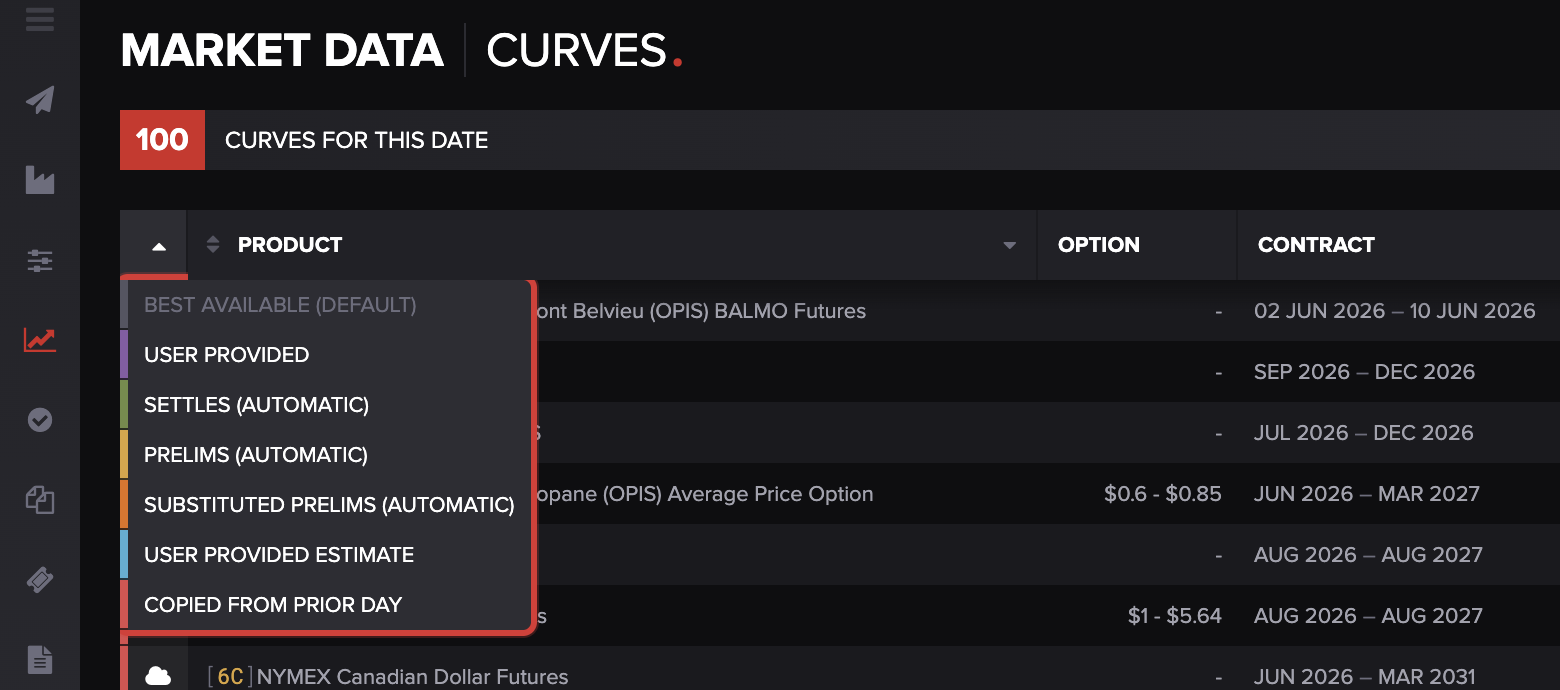
The fastest way to tell a fresh price from a carried-forward one is the mark source — where the price came from. On the Curves screen (Market Data → Curves), open the mark-source filter — the small funnel control at the top of the Product column — to switch the view between sources. Each source has a plain-language name in the UI; the technical "curve source" value (used in the API and in support conversations) is shown in parentheses:
Settles (Automatic) (
vendor) — a fresh price from an automated feed (for example, a Morningstar settlement, an ICE settle file, or a CME/NYMEX final settlement). This is "today's real price."Copied from Prior Day (
copy) — a mark copied forward from a prior day because no new price arrived. This is the stale tell.Prelims (Automatic) (
prelim) — a preliminary or intraday price (such as an intraday CME settle) that hasn't been finalized yet.Substituted Prelims (Automatic) (
prelim_copy) — a preliminary price carried over to a related product; still tentative.User Provided (
user) — a price you uploaded or entered yourself.User Provided Estimate (
user_estimate) — an indicative estimate you uploaded (see "A word on estimates" below).Best Available (Default) — the default view. It shows the single highest-priority mark Molecule is actually using to value each product.
The self-check: on a day you expected a fresh settlement, leave the filter on Best Available (Default) and note the value, then switch the filter to Settles (Automatic) to see whether a fresh vendor settle actually exists for that date. If there's no Settles (Automatic) mark and the Best Available value is coming from Copied from Prior Day (or Substituted Prelims), the feed hasn't delivered a final price yet. For the full list of mark sources and how they rank, see "Mark Levels."
Two things change what you do next. First, many "stale" prices fix themselves: a fresh Settles (Automatic) mark replaces a copied-forward one the moment it arrives, and Molecule re-values automatically — so a midday-stale price may just be waiting on a settle that lands later. Second, your own upload outranks everything, including vendor feeds — which is what makes the workaround below work.
A note on timing: feeds arrive at different points in the day — copies are in place in the morning, preliminary prices land during the session, and final vendor settlements arrive toward end of day. A price that looks stale before its feed's normal arrival time may not be late at all.
One honest limitation:
Molecule does not show customers a feed-status dashboard — there's no "feeds healthy / running late" view today. So check the mark source on the marks you rely on, especially after a weekend or holiday or when a number looks unchanged.
The mark-source filter (your self-check). On the Curves screen (Market Data → Curves), the funnel at the top of the Product column opens this filter. Best Available (Default) is the value being used to value your positions; switch to Settles (Automatic) or Copied from Prior Day to see whether today's price is a fresh settle or a carried-forward copy.
Fix it now: upload a temporary mark
If a vendor mark is stale or missing and you need correct valuations now — for end-of-day risk or a report that's due — you don't have to wait for the feed. Upload the correct price yourself. A mark uploaded the normal way is saved as User Provided (user), the highest priority, so it replaces the copied-forward or stale value for valuation immediately.
Go to Market Data → Curves , click Actions (top right), and choose Download Curves Template — a pre-formatted
.xlsxfile.Put the as-of date (the business date the prices apply to) in cell A1 .
Enter product short names as the column headers starting in cell B1 — each must exactly match a product short name in your account.
Enter contract start dates down column A from row 2, and fill each cell with the price for that product and contract period.
Save the file. Do not put "estimate" in the filename (see below) unless you specifically want an estimate.
Back on the Curves screen, click Upload File , choose your file, and upload it. Check the result for confirmation or errors, and fix and re-upload if anything is flagged.
Molecule re-values the affected positions automatically once the upload succeeds, and your User Provided mark takes precedence over the stale one. For the full mechanics — the template layout, the start-date convention, and the messages view that confirms success or shows row-level errors — see "How to Import Market Data Curves."
Remove it once the feed is back. Because a User Provided mark outranks vendor feeds, it will keep overriding the vendor price even after the feed is restored — so an override is a temporary patch, not set-and-forget. To hand pricing back to the feed, remove your manual mark: on the Curves screen, click the product to open its detail panel, find your mark in the list at the bottom (each row shows the contract, value, and last-updated time), and click the delete (trash) icon on that row. Molecule retains the vendor mark underneath and re-selects it automatically, re-valuing without further action.
A word on estimates
If your upload's filename contains "estimate" (or "estimated" or "estimation"), the marks are saved as User Provided Estimate (user_estimate) instead of User Provided (user). That matters: user_estimate ranks below vendor (and below preliminary prices), so an estimate won't override a live feed the way a normal upload does — it provides an indicative price that steps aside when exchange data arrives. If you want your upload to take top priority, keep "estimate" out of the filename. See "Mark Levels."
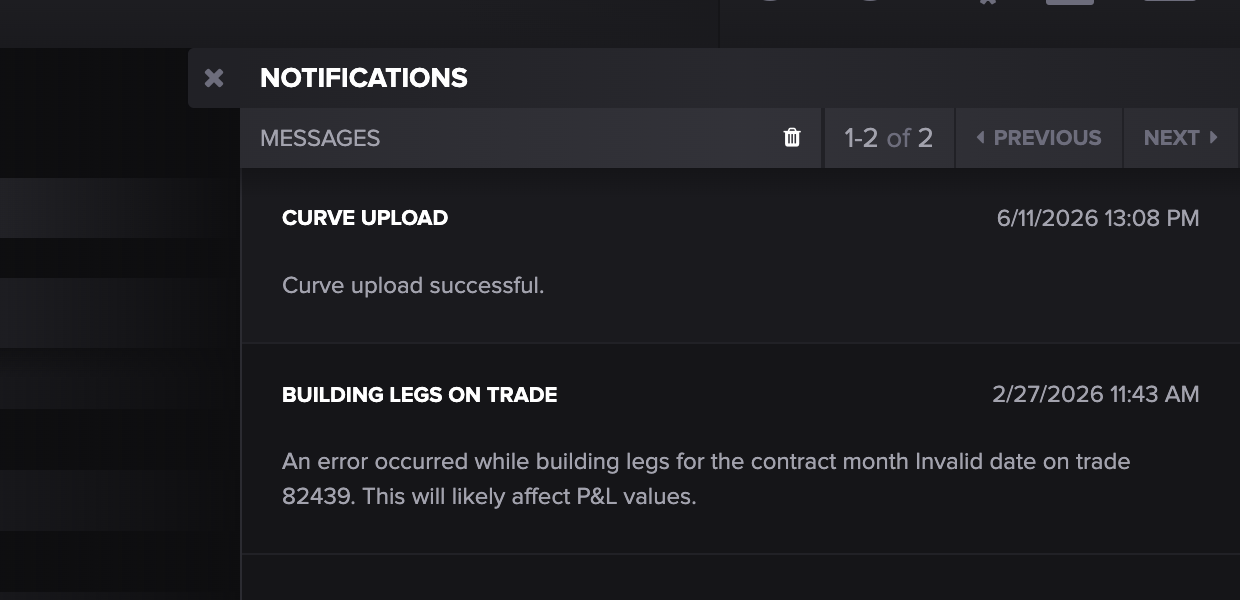
Upload confirmation. After uploading, check the Messages panel (the envelope icon, top right) to be sure your marks were accepted; a successful import shows "Curve upload successful," and any row-level errors are listed here so you can correct and re-upload.
Diagnose it by symptom
A price hasn't changed / looks stale. Check the mark source: Copied from Prior Day or Substituted Prelims (copy / prelim_copy) means no fresh price was delivered. If it's before the feed's usual arrival, the final price may just not have published; over a weekend or holiday, a copied-forward price is expected, not a fault. Need correct numbers now? Apply a manual override (above). If a price should have arrived and hasn't by end of day, escalate.
A curve or mark is missing entirely (no valuation row). Confirm a mark is actually expected for that product and date — with no market data, there's nothing to populate a row (see "Valuation & Relevant Products"). If it's a brand-new product, the curve may not be configured yet — a setup item, not a feed failure. Otherwise, upload a manual mark to unblock, then escalate the feed.
The price is present but doesn't match the vendor's value. Check the mark source first (a copied-forward mark from the wrong day?), then confirm you're comparing the same contract, tenor, and units as the vendor's figure. If it's genuinely a wrong value from the feed — not stale, not a unit mismatch — escalate; a consistently wrong value can be a mapping issue support can correct.
When to contact support, and what to include
Repairing a broken or stale feed is a support task — Molecule re-pulls or repairs the connection. Keep valuing with a manual override in the meantime; the escalation is to fix the feed itself. To make diagnosis fast, include:
Which vendor/feed — Morningstar/ZEMA, Platts, ICE settle, CME/NYMEX, NRGStream, Nodal, and so on.
The product(s) and curve name(s) affected , and — importantly — whether it's all products on that feed or just one . That single distinction materially speeds diagnosis.
The as-of date(s) showing stale or missing marks.
The mark source you observed — e.g., "the Best Available value is coming from Copied from Prior Day on 2026-06-10 when we expected a fresh settle."
Whether you've applied a manual override , so support knows your valuations are patched, not broken.
On timing: Molecule retries feeds through the day and will repair the connection; ask your support contact for status on a specific feed.
FAQ
My prices didn't change over the weekend — is the feed broken?
Probably not. When no market publishes, Molecule copies the prior business day's marks forward to keep positions valued, so an unchanged price is expected — confirm with the mark source, where the value will show as Copied from Prior Day (copy) over a non-trading day, which is normal.
Can I put in my own price until the feed is back?
Yes — upload a curve with the correct price (Market Data → Curves → Upload File). It saves as a User Provided (user) mark, which outranks the feed, so valuations correct immediately. Just remove it once the feed is healthy again, since it will keep overriding the real vendor price until you do.
Why does a stale price still show a number instead of an error?
By design — rather than leave a gap that breaks valuations, Molecule carries the prior day's mark forward. That keeps positions valued but makes staleness silent, so the tell isn't an error; it's the mark source (check it via the mark-source filter on the Curves screen).
The vendor published a price but Molecule shows a different one — why?
Most often it's a copied-forward mark (the fresh one hasn't landed) or a different contract, tenor, or unit than the vendor's figure. Check the mark source and confirm the contract and units; if it's genuinely wrong from the feed, escalate.
How do I know which of my feeds are healthy?
There's no customer-facing feed-status view today. The reliable check is the mark source on the marks you depend on — use the mark-source filter (switch to Settles (Automatic) to see whether today's settle has landed) after weekends and holidays, and any time a price looks unchanged when you expected movement.
Related articles
Editor: hyperlink each of these to its help.molecule.io article before publishing (URLs to be confirmed once web access is restored).
If you're still stuck after the checklist above, contact support@molecule.io with the details listed in "If none of these explain it."