A Trade Is Missing From Molecule: Troubleshooting Exchange Trade Feeds
Last updated: October 9, 2026
If you executed or cleared a trade on an exchange (ICE, CME/NYMEX, Nodal, EEX, SGX, and so on) and it hasn't appeared in Molecule — or arrived late, duplicated, or under the wrong book or trader — this guide will help. Most cases trace to a handful of causes you can check in minutes; the rest resolve far faster when you give support the right identifiers up front. So the most useful thing you can do is gather the details in Before you start first.
Not the problem you have?
A trade is in Molecule but the numbers look wrong (a manual trade not valuing, or missing report rows) → see the report-discrepancy article.
The trade is there but its price/mark is missing or wrong → that's a price-feed issue (separate article).
Setting up an exchange feed, or changing field mappings → see "ICE + CME Adapters."
A trade you loaded via the API is missing → see the API article.
How exchange trades reach Molecule
Molecule receives exchange and cleared trades through a configured trade adapter — a live connection to the exchange or clearing venue. These adapters use STP (Straight-Through Processing): trades flow directly from the exchange or clearing venue into Molecule and are parsed and field-mapped automatically, with no manual entry. Molecule has three built-in exchange adapters that work this way — ICE, CME, and Nodal — and each incoming fill is routed to the correct trader and book using the trader and tag/book mappings configured for your account.
Two timing facts explain most "where's my trade?" moments:
Trades are built asynchronously. Feeds run continuously during exchange hours, but fills process through a background queue, so there's always a short gap before a trade appears — and it grows around market close. A few minutes' lag at close is normal.
The ICE feed isn't active on weekends. Trades executed on ICE on a Saturday or Sunday (physical gas is the common case) won't land until Monday morning, when the session resumes. It's an ICE infrastructure constraint with no workaround, and it's why weekend position reports can legitimately look incomplete. The same applies on exchange holidays.
Clearing across more than one account? A single ICE or CME adapter is configured at the account level and captures trades from multiple clearing accounts through FCM allocation routing — not separate adapters. So a trade missing from a second clearing account is almost always a mapping or product issue, not a missing feed.
Before you start
Gather these first. They let you check most causes yourself, and they're exactly what support needs — collecting them now is what turns a multi-day back-and-forth into a same-day fix:
Exchange and clearing account the trade was executed/cleared under.
Exchange/clearing deal ID or execution ID.
Trade date and time (with time zone if you can).
Product/contract — the exact contract, including any block (e.g., 5x16 vs 7x16).
Trader name exactly as it appears on the exchange — the login the trade was done under. Critical for mapping issues.
The book you expected.
The Molecule M.ID , if a record was created. (An M.ID is Molecule's internal trade ID.)
Any exchange- or clearing-side routing details for the trade — for example, which exchange or adapter it should have come through (ICE, CME, or Nodal). These come from your exchange/clearing setup or from support, not from Molecule.
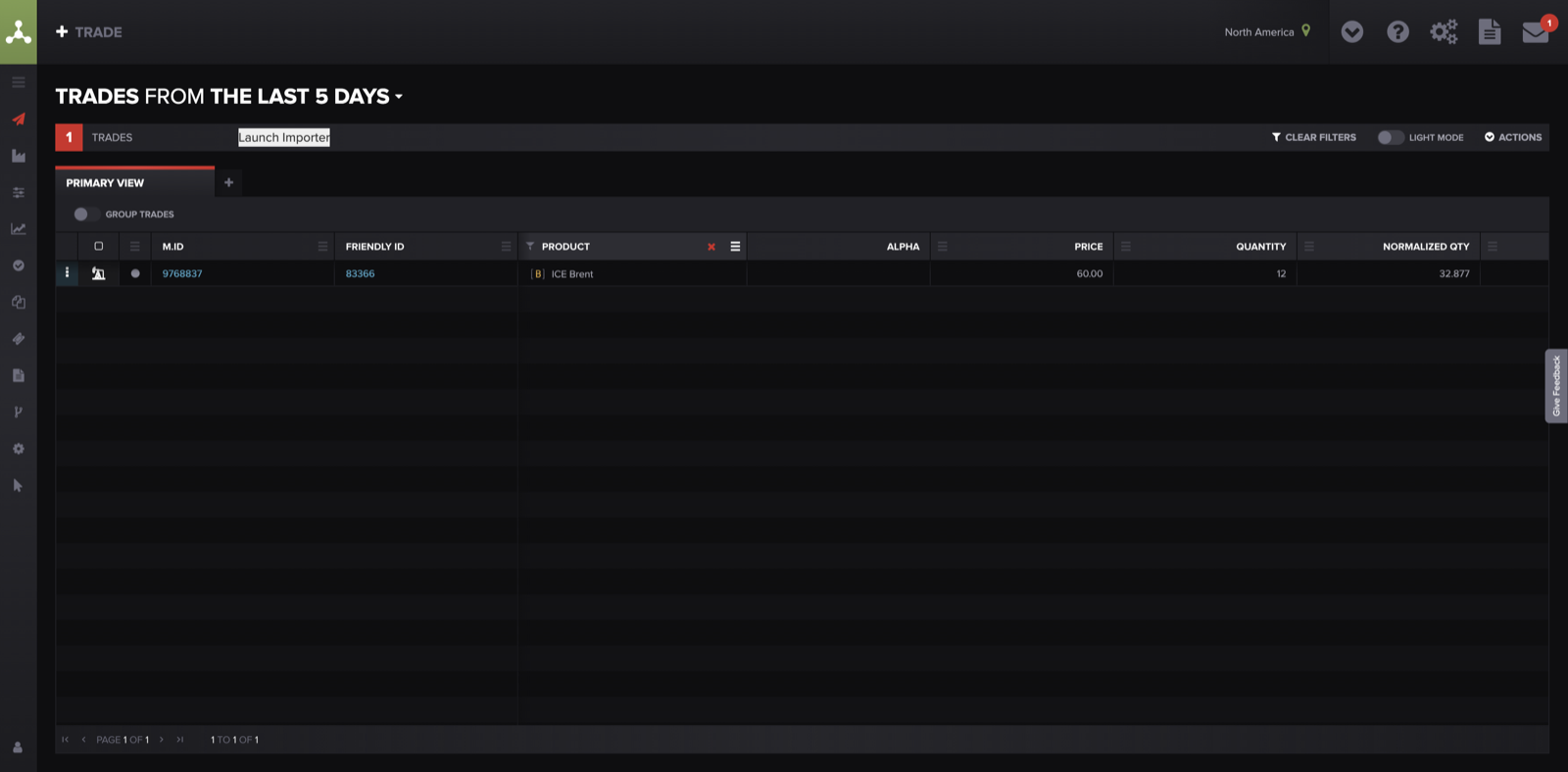
Filter the Trades screen by date and product to confirm whether the trade is truly missing — or just filed somewhere you didn't expect.
The checklist
Symptom 1 — The trade isn't in Molecule at all
First, rule out that it's just filed somewhere unexpected: if it turns up under a different book or trader when you filter the Trades screen, jump to Symptom 2.
Weekend or holiday timing. Check this first for anything missing on a Monday or after an exchange holiday. A trade executed on ICE while the exchange was closed arrives when the session resumes the next business day — no action needed. If it's still absent after that, keep going.
Normal lag — it just hasn't arrived. Common right after market close. Wait a few minutes and refilter the Trades screen by trade date. If it's been much longer, move to the mapping causes below.
A new or unrecognized trader login — the single most common cause. If the exchange sends a trader or account identifier Molecule doesn't have mapped, the trade has nowhere to land and may not appear in your usual view. Check: was it done under a new trader, a new exchange login, or an unusual account? Do: you can't change these mappings yourself — trader and tag/book mappings are configured by Molecule support. Escalate with the trader name exactly as it appears on the exchange.
The contract isn't set up in Molecule yet. With no product configured, the feed has nothing to map the trade to, so it can't be created — common for newly traded contracts or markets. Check: have you traded this contract, market, or expiry in Molecule before? Do: request the new product (see "How to Request New Products" ); once it's set up, the trade can be reprocessed.
A whole batch is missing (a feed gap). Check: are multiple trades from the same exchange and the same day all missing, not just one? Do: that points to a feed gap on our side, not your setup — don't re-enter anything. Tell support it looks like a whole-batch gap, and include the exchange, date, and account.
Symptom 2 — The trade is there, but mapped wrong (book, trader, or product)
It landed in the wrong book or under the wrong trader. This comes from the same mapping layer, and fixing it has two parts. (1) Support corrects the underlying mapping so future trades from that exchange login route to the right book and trader — escalate with the trader name as it appears on the exchange and the book you expected. (2) You then fix the trades that already landed wrong: open the trade → hamburger menu → Amend → change the Book and Trader fields → Save . Amending a trade fixes only that trade — it doesn't change the mapping going forward, which is why step 1 matters too.
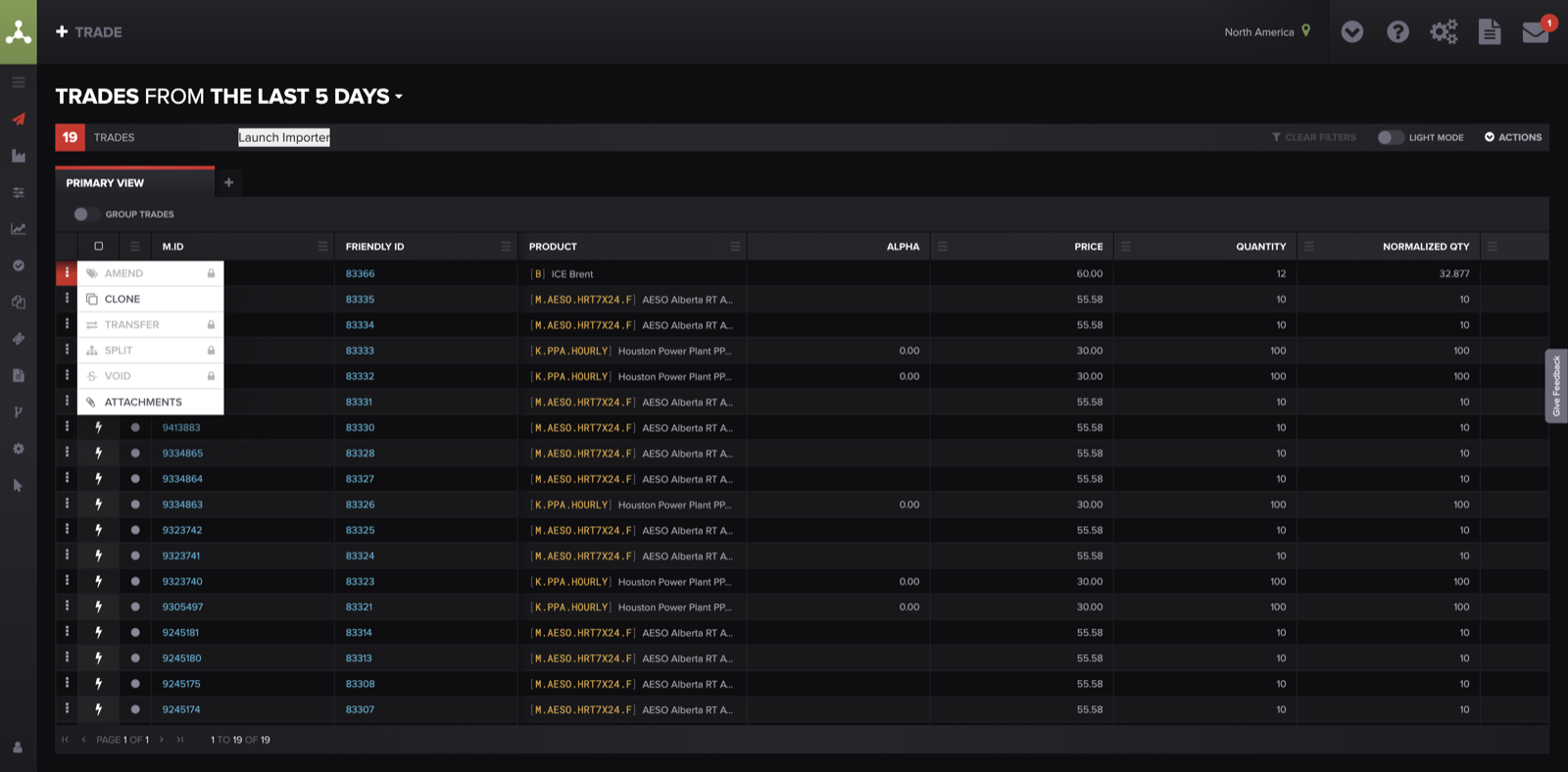
To fix a trade that landed in the wrong place, open the trade's actions (⋮) menu and choose Amend, then change the Book and Trader and Save.
The product spec is wrong (block or counterparty). The contract arrived, but with the wrong specification — for example, the wrong power block (5x16 vs 7x16) or the wrong counterparty on an exchange product. Check: compare the trade's product and spec against what you traded. Do: exchange product specs are maintained by Molecule — send support the M.ID and the correct spec. (You can't edit product specs directly.)
Symptom 3 — Duplicate or "ghost" trades
The same trade appears twice, or one you don't recognize shows up. This is usually normal exchange behavior, not a Molecule error: ICE sometimes retransmits the same trade with the same execution ID, arriving up to about an hour after the original, and CME duplicates can come from splits in CME IDs. Check: note the affected M.IDs . Do: don't void them yourself — support keeps the earliest record and voids the later one, and voiding the wrong copy can remove the good trade. Send support the affected M.IDs and we'll confirm what's a true duplicate. (For how voiding differs from deleting, see "Void vs Delete in Molecule." )
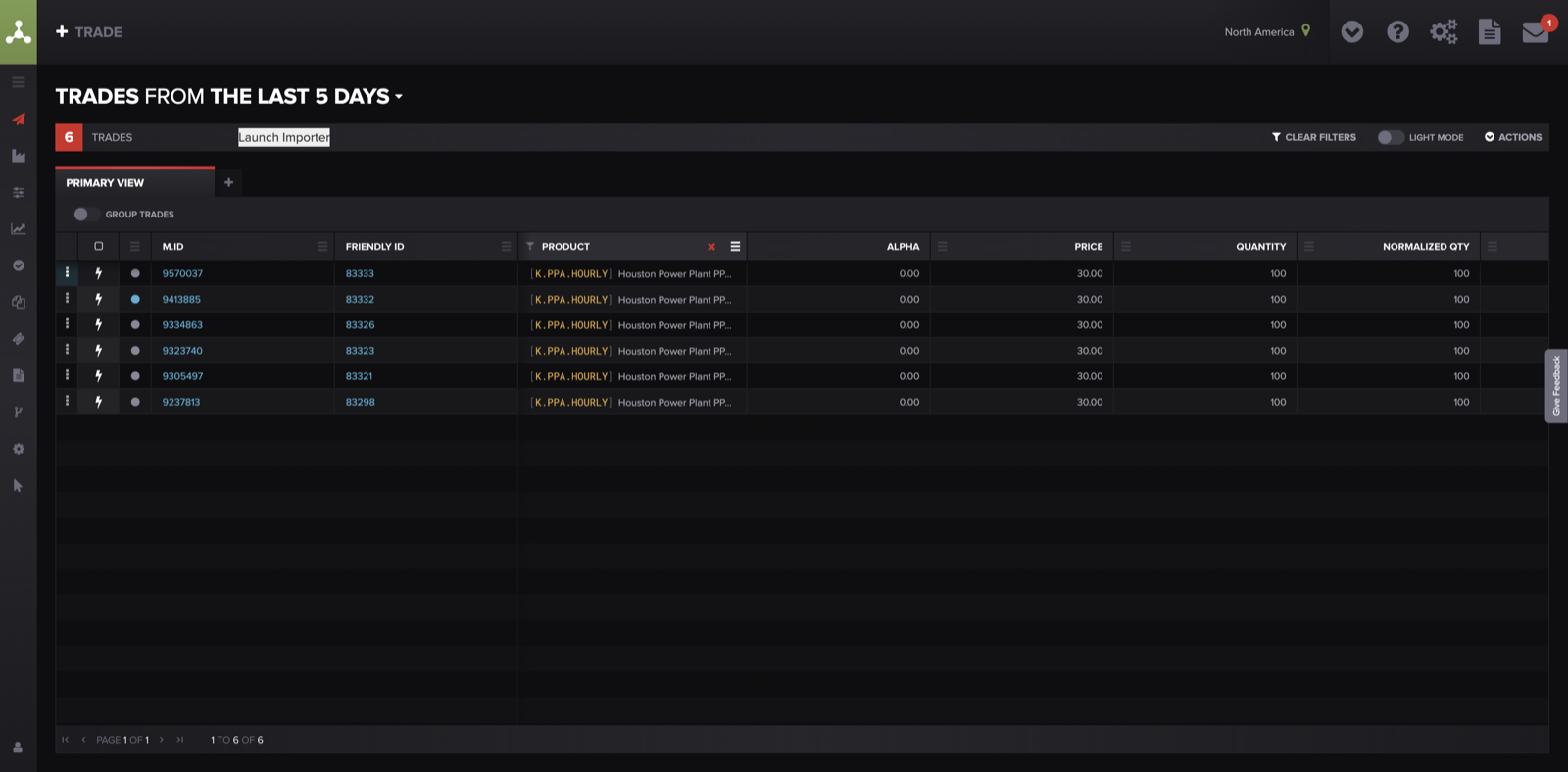
Near-identical rows with different M.IDs — note both M.IDs and send them to support rather than voiding either one yourself.
If none of these explain it — what to send support
Email support@molecule.io with everything from Before you start, plus two things that let us trace the trade right away:
the exchange confirmation (your fill or clearing confirm); and
whether it looks like one trade or a whole day's batch that's missing — that alone tells us whether to look at a mapping or a feed gap.
With those, we can find the trade in the feed, see where it stopped, and either correct the mapping or reprocess it. Not sure which feed it used? Say so — we can check.
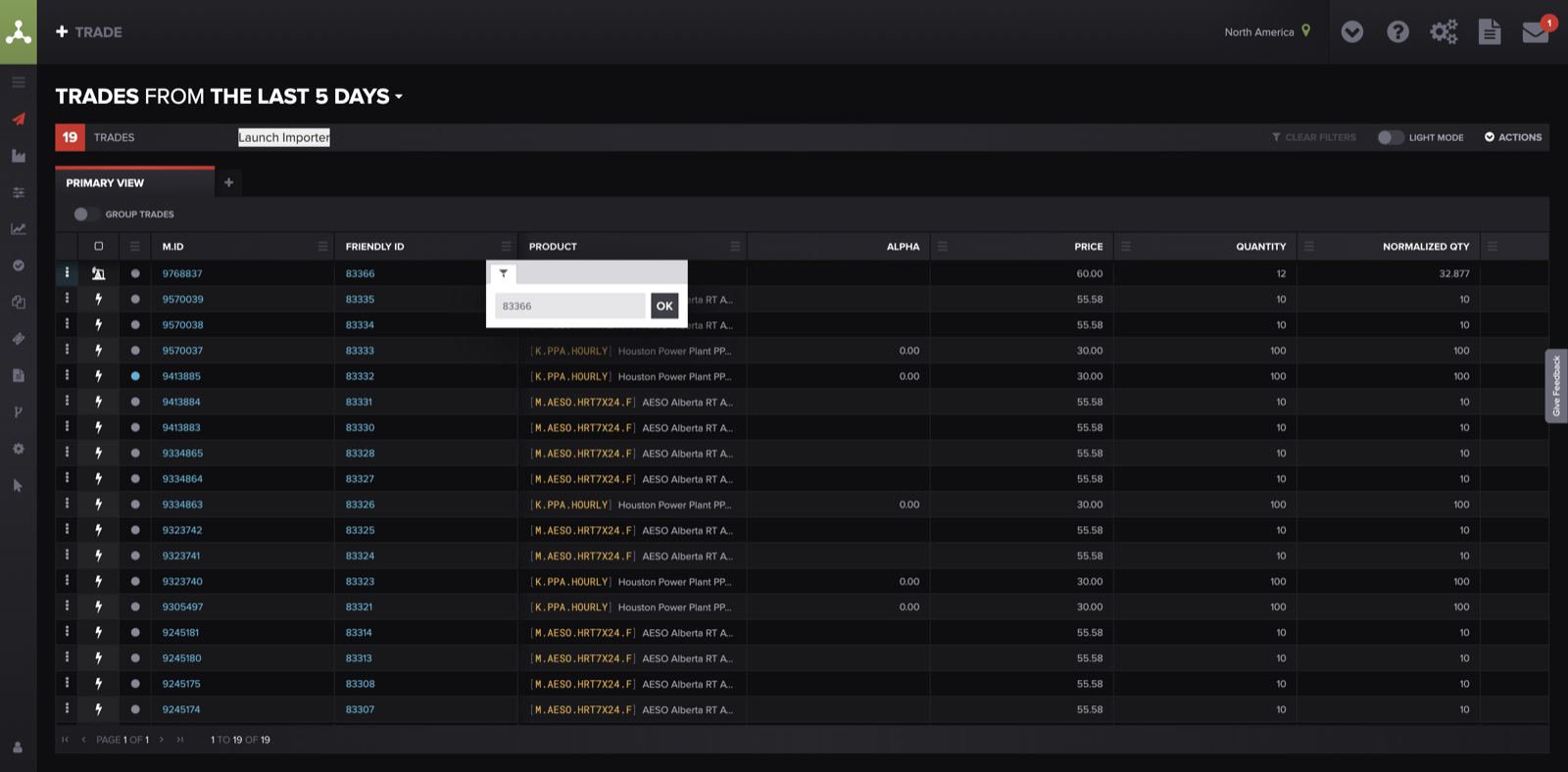
Filter the Trades screen by a trade identifier (M.ID or Friendly ID) to capture the exact result — or confirm the trade's absence — for your support ticket.
FAQ
My weekend trades are missing — is something broken?
No. The ICE feed isn't active on weekends, so Saturday/Sunday trades (often physical gas) appear Monday morning when the session resumes — and weekend position reports can look incomplete for the same reason. There's no workaround; they process normally on Monday.
I see the same trade twice — should I delete one?
Don't void either copy yourself. Duplicates are usually normal exchange behavior (ICE retransmissions, or splits in CME IDs), and voiding the wrong one can remove the good trade. Send support the affected M.IDs and we'll confirm which to keep.
A trade landed in the wrong book — can I just move it?
You can, but do both halves: open the trade → hamburger menu → Amend → change the Book and Trader → Save to fix that trade, then ask support to correct the underlying mapping so the next trade from that login lands correctly.
How long should I wait before assuming a trade is missing?
During exchange hours, a few minutes (longer around close), then refilter by trade date. Over a weekend or holiday, expect it the next business day; beyond that, start with Symptom 1.
Related articles
Editor: hyperlink each of these to its help.molecule.io article before publishing (URLs to be confirmed once web access is restored).
If you're still stuck after the checklist above, contact support@molecule.io with the details listed in If none of these explain it.