# Fee Maintenance
#### About
Maintain custom fee types and define fee schedules to automatically apply fees to trades.
#### Access
Access to fee maintenance is restricted to users with specific permissions. If granted the `Fee Admin` permission, you can maintain fee types and fee recommendations for your account. Find `Fees` in the Navigation menu `Settings` > `Account Settings` 💡 **Tip:** If you don't find `Fees` in the menu, you'll need to request access from your account administrator.
#### Fee Types
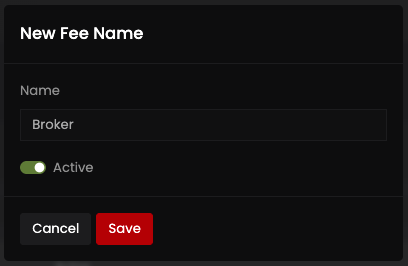
Click the (+) button on the Fee Names section of the screen to add a new fee type. Provide a name for the fee type and click save. The new fee type can be used on Trades and Fee Recommendations.
#### Fee Recommendations
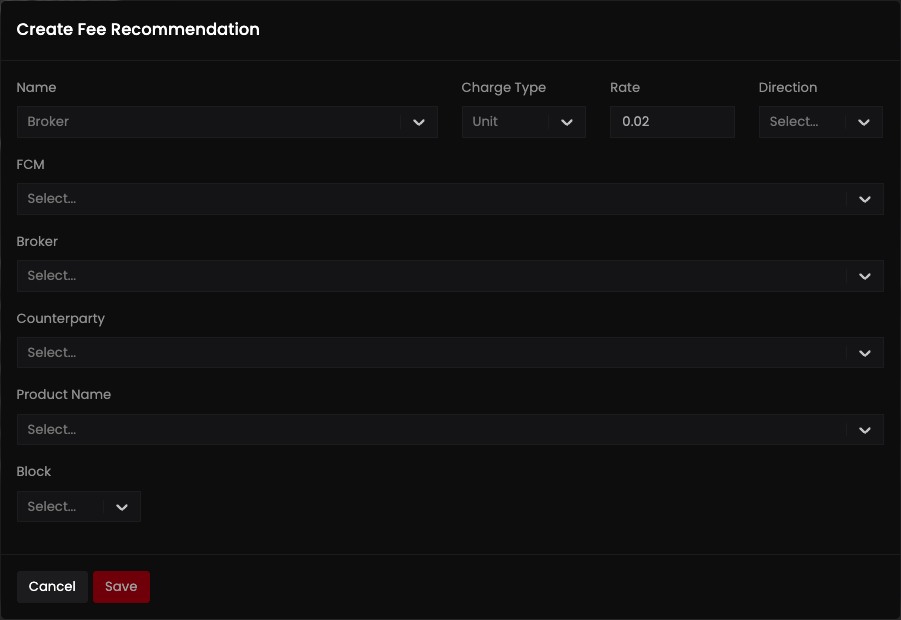
Fee recommendations are schedules that are used to apply fees automatically to trades. Click the (+) button on the Fee Recommendations section of the screen to add a new fee recommendation. Select a Name, Charge Type and Rate. Provide as many remaining attributes as necessary to create the proper fee recommendation.
---
# Agent Instructions: Querying This Documentation
If you need additional information that is not directly available in this page, you can query the documentation dynamically by asking a question.
Perform an HTTP GET request on the current page URL with the `ask` query parameter:
```
GET https://help.molecule.io/core-functionality/core-features/fee-maintenance.md?ask=
```
The question should be specific, self-contained, and written in natural language.
The response will contain a direct answer to the question and relevant excerpts and sources from the documentation.
Use this mechanism when the answer is not explicitly present in the current page, you need clarification or additional context, or you want to retrieve related documentation sections.