# How to Enter Fee Information
If you'd like to enter fee information on a trade, select the **MORE** drop-down on the left-hand side:
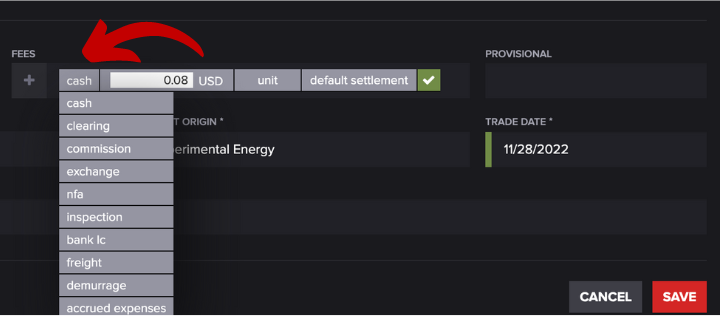
To specify the type of fee, click the gray box next to the **+** sign under fees. Then, you can choose from the drop-down menu:
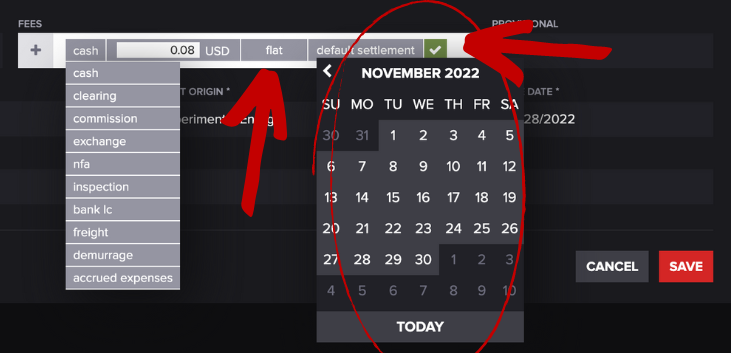
Next, select whether the fee is a **unit**, **flat**, or **contract** by clicking on the gray 3rd box. Select the settlement date by clicking on the fourth box and choosing a date on the calendar:
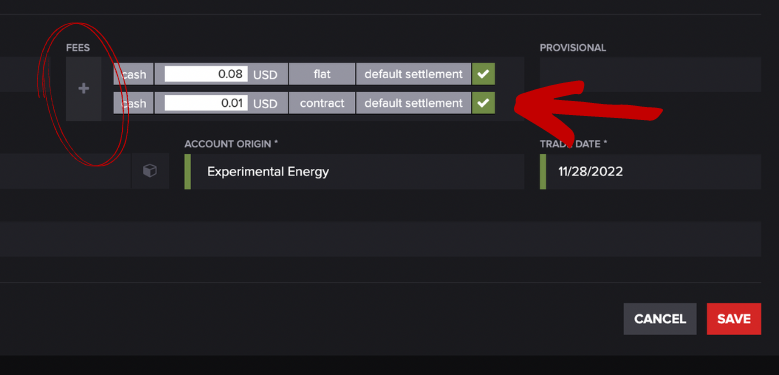
To add another fee, click the **+** button. A cell should populate under the first one you can modify by following the steps above. It will look something like this:
If you would like to indicate that you are receiving the fees rather than paying them, you can enter a negative value into the field. Press **SAVE** when you're finished.