# Trade Lifecycle Attachments
#### Overview
Learn how to manage your trade documents.
Upload and manage documents for Trades, Sublegs, or Tickets. This feature accommodates all aspects of of a Trade from inception to delivery, from financial records (Confirmations, General Ledger (GL) Entries) to physical delivery (e.g., Bills of Lading) documents, ensuring secure storage and providing a comprehensive audit trail.
#### Supported Actions
1. **Upload**
* Go to the Trades or Tickets screen\*
* For any Trade or Ticket, click the hamburger (3 dot) menu
* In the dialog box, click **+FILE** to upload documents\
\&#xNAN;*\*this is also supported for Trade Sublegs.*
2. **View/Download**
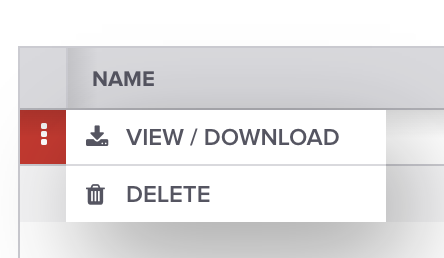
* Click the hamburger (3 dot menu) and select "VIEW/DOWNLOAD".
3. **Delete/Replace**
* Click the hamburger (3 dot menu) and select "DELETE" to remove a file.
* To replace, delete the current file and upload a new one.
#### File Specifications
* **Document Types:** Includes Bill of Lading, Confirmations, GL Entries, Invoices
* **Supported Formats:** PDF, Excel Sheets (.xls, .xlsx), CSV, Word Documents (.doc, .docx), Images (.jpg, .jpeg, .png, .tif, .tiff, .svg).
* **Maximum Size**: Up to 10MB per file
#### **FAQ**
**How does this feature help in maintaining an audit trail?**
This feature makes it easy to track changes and maintain a comprehensive record for auditing purposes by centralizing all trade-related documentation in one place.
**Who can access these attachments?**
Access to attachments is governed by user [permission settings](/onboarding/welcome-and-getting-started/access-control-users-and-groups/permissions.md). Only authorized users can view, upload, or modify attachments.
**Is there an API available to post and get attachments?**
Yes, there is an API available. You can find the developer documentation for those API's here. .
**Is it possible to attach documents to Trade Sublegs?**
Attachments can be linked to Trade Sublegs just as they can be to Trades and Tickets.
**What types of documents can I attach to a Trade or Ticket?**
Bills of Lading, Confirmations, General Ledger (GL) Entries, and Invoices
**How do I upload a document to a Trade or Ticket?**
Navigate to the Trades or Tickets Screen, select a Trade or Ticket via the hamburger menu, and click on "**ADD FILE**" in the dialog box to upload your document.
**Are there any limitations on the file size or format?**
Yes, each file must be 10MB or smaller. Accepted formats include PDF, Excel (.xls, .xlsx), CSV, Word Documents (.doc, .docx), and Images (.jpg, .jpeg, .png, .tif, .tiff, .svg).
**Can I view or download attachments after uploading them?**
Absolutely. You can view or download any attached file by clicking the "**VIEW**" or "**DOWNLOAD**" options.
**How can I delete or replace an attachment?**
To delete an attachment, click on **"DELETE**." To replace a file, delete the existing file and then upload the new one.
**Have a question this article wasn’t able to answer?** Reach out to your Customer Success Manager to get the answers you need.
---
# Agent Instructions: Querying This Documentation
If you need additional information that is not directly available in this page, you can query the documentation dynamically by asking a question.
Perform an HTTP GET request on the current page URL with the `ask` query parameter:
```
GET https://help.molecule.io/core-functionality/core-features/specialized-features/trades/trade-workflows/trade-lifecycle-attachments.md?ask=
```
The question should be specific, self-contained, and written in natural language.
The response will contain a direct answer to the question and relevant excerpts and sources from the documentation.
Use this mechanism when the answer is not explicitly present in the current page, you need clarification or additional context, or you want to retrieve related documentation sections.