# Trades: Calculating Position and P\&L
In Molecule, a Trade and its Position are not the same thing.
#### Trades
To the system, **a Trade is a contract that you execute**, such as a fill for an order on an exchange.
#### Positions/P\&L
Molecule creates a Valuation row for every reporting date between the Trade Date and each leg's Settlement Date. These Valuation rows contain 150-odd attributes, including position (called unit quantity) and various P\&L metrics (realized, unrealized, daily change, etc.).
**The sum of all Valuation rows, for all trades, for today's reporting date, is your position.** Since Molecule calculates this at such a granular level, you can slice and/or aggregate your position by just about anything -- exchange ticker, tenor, commodity, location, custom field. As a result, you don't have to wonder whether Molecule contemplated a specific trade in your position or P\&L. You can pull a Valuations extract and see it.
#### Frequently Asked Questions
#### **Doesn't this create a lot of data?**
Yes. Molecule is designed to handle this.
#### **The Position is wrong on the Trades screen!**
That's because the Trades screen doesn't show position. If you use it to triangulate position, it will be incorrect when contemplating strips and options. The Valuations screen (and extracts, and custom reports we build for you) are what show position.
#### **I want to see Position/P\&L for this single trade.**
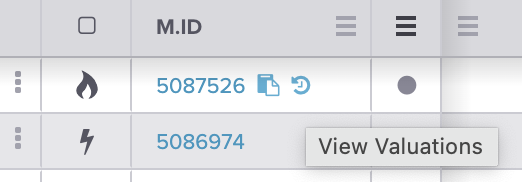
On the Trades screen, hover your mouse above the M.ID (trade ID), like this. Click the backwards clock icon on the right, and you'll see the history of that trade's valuations:
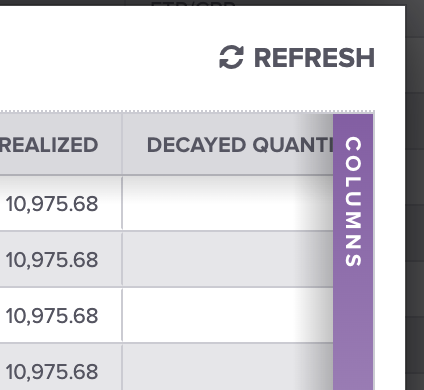
You can use the purple column selector on the popup to pick which valuation metric you want to see:
---
# Agent Instructions: Querying This Documentation
If you need additional information that is not directly available in this page, you can query the documentation dynamically by asking a question.
Perform an HTTP GET request on the current page URL with the `ask` query parameter:
```
GET https://help.molecule.io/core-functionality/day-to-day-use/trades-calculating-position-and-p-and-l.md?ask=
```
The question should be specific, self-contained, and written in natural language.
The response will contain a direct answer to the question and relevant excerpts and sources from the documentation.
Use this mechanism when the answer is not explicitly present in the current page, you need clarification or additional context, or you want to retrieve related documentation sections.