An Exchange Trade Came In Wrong: Fixing Book, Trader, Fees, and Specs
Last updated: October 9, 2026
Your exchange or cleared trade made it into Molecule, but something about it is off — it's in the wrong book or under the wrong trader, its fees are missing, or its product specs don't match. The good news is that most of these split cleanly into two buckets: things you can fix yourself in under a minute, and things controlled by the feed or product setup that you escalate to support. This article tells you which is which, and walks through the one fee case that currently needs a manual fix.
Not the problem you have?
The trade is entirely missing from Molecule, or duplicated → see "A Trade Is Missing From Molecule: Troubleshooting Exchange Trade Feeds."
The trade is fine but its settlement price is missing or stale → see "Exchange Settlement Prices Missing or Wrong: ICE and CME/NYMEX Settles."
You need a brand-new product that doesn't exist yet → see "Requesting a New Exchange or ISO/RTO Product in Molecule."
What you can change vs. what's controlled by the feed
On an exchange-originated trade, the fields fall into two groups:
Fields you can amend yourself: Trader , Fees , and Tags . A trade's book is its sanctioned tag , set in the Tags field — there is no separate "Book" field on the form, so the book and its tag are the same control.
Fields controlled by the feed and product setup, which you can't edit directly: product specs, quantity, and price. Exchange product specs are maintained by Molecule.
Almost everything below follows from that split: if it's book, trader, fees, or tags, you can likely fix it now; if it's specs, quantity, or price, it's an escalation.
One thing that catches people: locking. Even the amendable fields (Tags, Trader, Fees) become read-only once a trade is locked. If you can't edit a field you expect to, the trade is probably locked — unlock it first from the trade's menu, then amend. (If you can't unlock it, your permissions may not allow it; check with your admin.) See "Trade Locking" for how locking and unlocking work.
Fees on a locked trade stay read-only in the UI; the v2 Fees API can still add, update, or remove them without unlocking. See Updating Fees on Locked Trades (API).
Unlocking is self-service and permission-gated, not support-only. A user with the edit_trade_status permission unlocks a trade via the Unlock action on the trade (an Unlock button is present in the trade's button row. If the Unlock option isn't available, it's a permissions matter for an admin. The locking article is published as "Trade Locking."
The trade landed in the wrong book or under the wrong trader
This comes from the exchange trade feed's trader/tag mapping: the exchange sends an identifier for the trader, and a mapping decides which Molecule trader and book the trade lands under. When that mapping is missing or wrong, trades default — often to "unassigned" or a default book.
Fixing this has two halves, and you need both:
Fix the trades already landed wrong — you can do this. Open the trade → hamburger menu → Amend → change the sanctioned tag in Tags (this is the trade's book ) and the Trader → Save . (Unlock first if the trade is locked.)
Fix it going forward — this is a support change. The underlying trader/tag mapping is configured by Molecule support, not in the UI. Amending the one trade does not update the mapping, so the next trade under that identifier will land wrong again until support corrects the mapping.
So: amend the existing trades yourself, and report the mapping to support so future trades route correctly. Give support the trader name/identifier exactly as the exchange sends it (for example, the ICE user ID), plus the Molecule trader name and the book it should land in.
Trader/tag mappings are support-configured, not customer-editable — this article's framing is correct. The public "ICE + CME Adapters" article presents these mappings as customer-configurable, which contradicts this; that article (not this one) should be reconciled so mapping changes are described as a support action.
Alpha.molecule.io trades-v2 Amend form). Shows the Amend form with the Tags field highlighted (the book is the sanctioned tag #demo) and the Trader field highlighted; the Unlock button is visible in the button row.
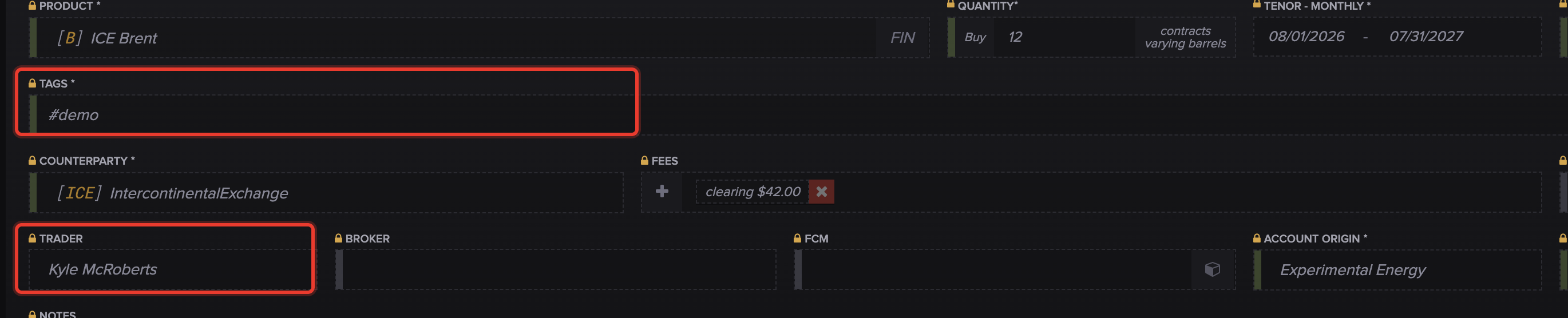
Open the trade, choose Amend, and change the book — its sanctioned tag in the Tags field — and the Trader, then Save. Unlock the trade first if it's locked.
Exchange or clearing fees are missing on the trade
Most exchange fees are applied automatically by the feed. But there's a known issue with one path: trades created from an ICE allocation report — the give-up or block allocation messages ICE sends after a block trade is processed (a give-up is a trade executed by one broker and passed to another for clearing; a block is a single large trade that is later split and allocated) — can arrive without exchange, clearer, and broker fees. The fee engine needs a fill record to apply those fees, and allocation-sourced trades don't carry one.
This is a known, acknowledged behavior with a clear workaround — not something you did wrong. Until it's resolved, add the fees manually on the affected trade (unlock first if it's locked). See "How to Enter Fee Information" for the steps. A quick tell: allocation-sourced trades show no broker/exchange fees, while manually entered trades for the same product show fees correctly.
Open in the internal KB — tracked as a known engineering issue (MOL-18829), with manual fee entry as the standing Tier-2 workaround. Safe to publish as current behavior; revisit if the fix ships.
Alpha.molecule.io trades-v2 Amend form). Shows the Fees section highlighted, with the + add-fee control and an existing fee chip.

For an allocation-sourced trade that arrived without fees, add the exchange, Clearer, and broker fees on the trade yourself.
The product specs are wrong (block, contract size, counterparty)
Product specs — the block (for example, 5x16 vs 7x16), the contract size, and the counterparty on an exchange product — along with quantity and price, are controlled by product setup and the feed. You can't edit these directly; exchange product specs are maintained by Molecule.
This one is an escalation. Report it to support with the specific product, the wrong value, and the correct value. If a whole product is set up wrong (not just one trade), say so — so support corrects the product itself rather than patching a single trade, otherwise new trades will keep landing with the same wrong spec.
Tags are wrong or missing
Tags — the #-prefixed labels you use for reporting filters and grouping — are amendable by you. Open the trade → Amend → update the Tags → Save (unlock first if it's locked). If many trades need the same tag change, ask support — there is no self-service bulk-tag action (the trade grid's bulk operations cover lock, confirm, workflow status, trade group, and delete, but not tags).
There is no dedicated bulk-tag article or feature. The documented bulk operations (internal: "3.16 Bulk Operations") are set workflow status, lock, confirm, set trade group, and delete — tagging is not among them. The original's "ask about bulk-tagging" was reworded to point users to support rather than a non-existent bulk-tag tool.
What to send support
For the escalations above — the forward-looking mapping fix and product-spec corrections — include:
the affected Trade ID(s) (the M.ID is the trade's ID in Molecule);
the exchange and clearing account ;
the trader name / identifier exactly as the exchange sends it (for mapping issues);
the product and contract period (for spec issues);
the wrong value vs. the correct value ;
whether it's one trade or every trade on that product or identifier — this tells support whether to fix a single trade or the product / mapping behind it.
FAQ
A trade landed in the wrong book — can I just move it?
Yes — open it, choose Amend, change the sanctioned tag in Tags (its book) and the Trader, and Save. But also report the mapping to support: amending the trade fixes that one trade, while the mapping is what routes future trades, and only support can change it.
Why are there no fees on my block or give-up trade?
Trades created from an ICE allocation report can arrive without exchange, clearer, and broker fees, because the fee engine needs a fill record that allocation trades don't include. It's a known issue — add the fees manually in the meantime.
Can I fix the contract specs myself?
No. Product specs, quantity, and price are controlled by product setup and the feed, and exchange product specs are maintained by Molecule. Report the wrong value and the correct value to support.
I amended the book but new trades still come in wrong — why?
Amending a trade only fixes that trade. New trades route by the trader/tag mapping, which support configures — until support corrects the mapping, new trades under the same identifier will keep landing wrong.
I can't edit the trade at all — why?
It's almost certainly locked, which makes its fields read-only. Unlock it first from the trade's menu, then amend. If you can't unlock it, your permissions may not allow it — check with your admin.
Related articles
Editor: hyperlink each of these to its help.molecule.io article before publishing (URLs to be confirmed once web access is restored).
If you're still stuck after the checklist above, contact support@molecule.io with the details listed in "If none of these explain it."