My Report Didn't Run, Is Empty, or Didn't Arrive: Troubleshooting Report Generation and Delivery
Last updated: July 1, 2026
A scheduled report that didn't show up splits into two very different problems: it didn't generate (it never ran, or ran but produced an empty file), or it generated but didn't deliver (it ran, but the file never reached your destination). Each has its own quick checks, and several you can run yourself in minutes. This article covers both. If your report did run and arrive but the data inside looks wrong or is missing rows, that's a different question — see "Why Does My Report Look Wrong?" instead.
Not covered here (see the companion articles):
A report that ran but whose data looks wrong or is missing rows → "Why Does My Report Look Wrong?"
A live, on-screen extract or API pull (not a scheduled delivery) → the API extract article and "Downloading Raw Data."
Changing a custom report's content (new columns or books) → that's a custom-report change request; those reports are Molecule-built.
How scheduled delivery works (in one paragraph)
Scheduled reports are produced on a set schedule and can be delivered to a destination you control — most often an SFTP server (SFTP = secure file transfer protocol; FTP and S3 are also possible). Two things have to both succeed: the report has to finish running, and the file has to reach your destination. Most "missing report" cases are a failure of one of those two steps — and the two have different checks, below.
First, three quick checks
Check the right delivery location. Files are delivered to a specific, agreed folder on your destination — not your root directory or an arbitrary path. If you're looking in the wrong folder, a report that landed exactly where it was configured can look "missing." Confirm the exact destination folder with whoever set up the feed on your side.
Re-run the report yourself, then loop in support if it still fails. There is no customer-facing view of a scheduled report's internal run status, so confirming whether a given run completed is a support action. What you can do yourself: if the report appears in your Batch Reports list (Reports → Custom Reports → Batch Reports ), use the Run action to trigger a fresh run. If the manual run produces the file, the original miss was almost certainly a transient one-off; if it fails or comes back empty every time, send support the details in "What to send support" below. A completed run that still didn't arrive points to a delivery problem; a run that won't complete points to a generation problem — support can confirm which from the run logs.
Confirm the destination is reachable. If your report delivers to SFTP and your IT team manages that server, have them confirm the destination folder and credentials are currently valid and that nothing is blocking the connection from their side. A connection test on Molecule's side — confirming credentials and connectivity for the next scheduled run — is a support action. (There is no self-serve SFTP configuration or connection-test screen in the app; that configuration lives on Molecule's side, so don't expect to find one — just send support the details and they'll run the test.)
Re-running a report from the Batch Reports screen.
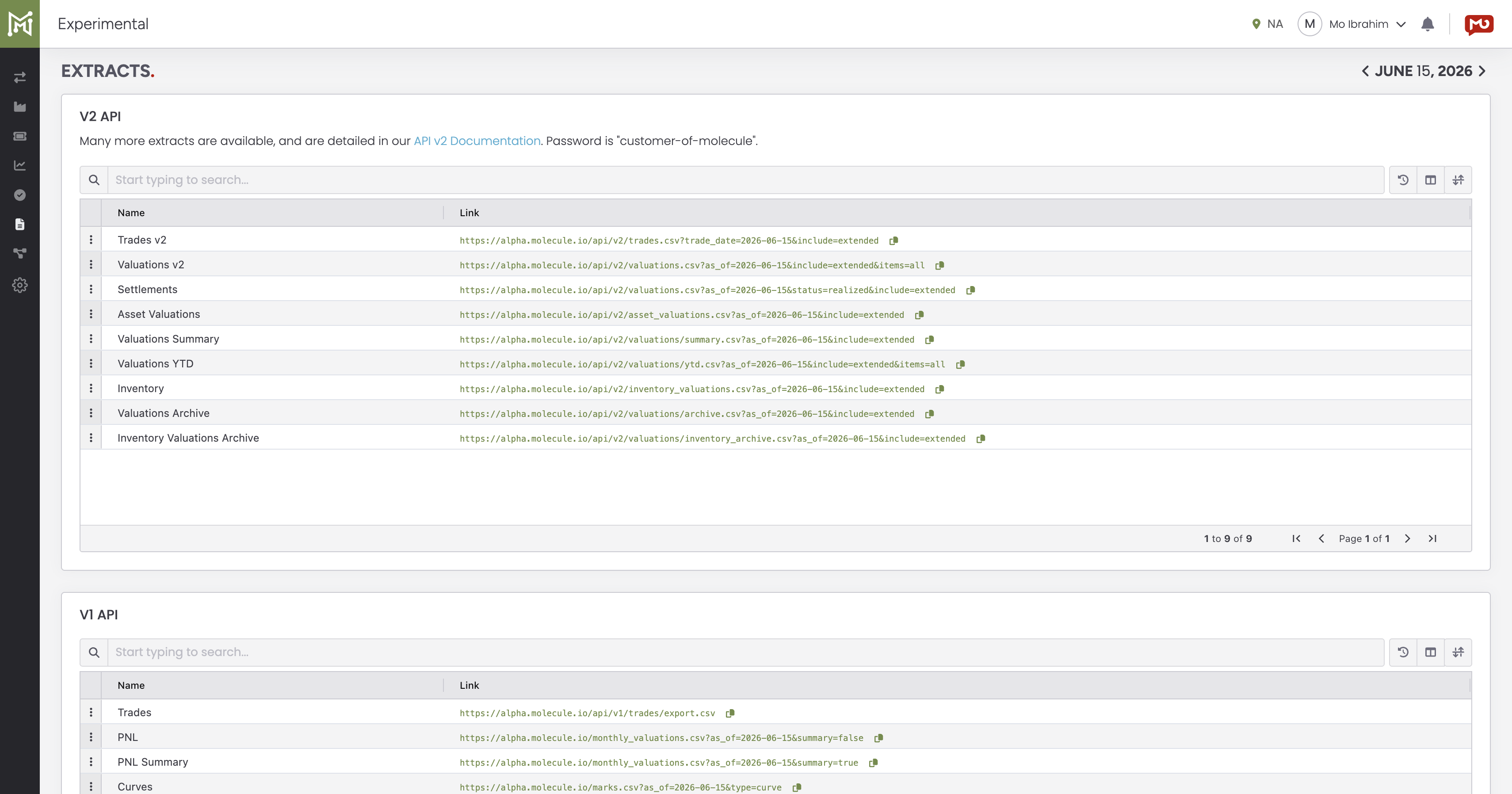
The reports area (Reports → Custom Reports / Extracts) is where scheduled outputs live; if a report is missing, you can trigger a fresh run yourself from the Batch Reports screen, and the Extracts list (shown below) is where the YTD and other extracts are available. Alt text: The Molecule Extracts screen listing available report extracts including Valuations YTD.
Didn't generate vs. didn't deliver
Once you know whether the report ran, you've split the problem in half.
It didn't generate (no file, or an empty file).
It didn't run or didn't finish for that date. Sometimes a scheduled run simply doesn't complete — a transient load issue is the usual culprit, and it typically runs fine on the next attempt. If a daily report is missing one morning, a quick retry usually tells you whether it was a one-off — and you can trigger that retry yourself with the Run action on the Batch Reports screen (see the quick checks above) . A report that comes back empty every time, across all dates, is a different matter — that's a report-logic issue for support to fix.
It ran but returned no rows. If the report's filters or date window matched nothing for that day, you get an empty file even though everything "worked." That's really a content/filter question — see "Why Does My Report Look Wrong?"
For YTD extracts specifically. If year-to-date (YTD) reporting isn't enabled for your account, the YTD file can come out empty. That's an account-level setting — ask support to confirm it's on.
It generated but didn't deliver (it ran, but never arrived at SFTP). These are almost all about the connection between Molecule and your destination:
Your credentials or server changed. If your SFTP host, port, username, password, or key changed, delivery fails until Molecule's stored configuration is updated to match. Send support the new details.
Your server's security settings changed (ciphers / key exchange / host key). SFTP connections negotiate a shared set of encryption, key-exchange, and host-key algorithms. If your server (or its security team) upgrades or hardens that configuration — disabling older algorithms, rotating the host key, or requiring newer ones — the connection can start failing even though the host, port, and credentials are unchanged. This is one of the more common "it worked yesterday, nothing changed on our report" causes. It's a support-side investigation: tell support if any SFTP/SSH security change, server upgrade, or migration happened on your side around the time deliveries stopped.
IP allow-listing. If your SFTP server (or its firewall) only accepts connections from approved addresses ( allow-listing , also called whitelisting), Molecule's delivery addresses have to be approved on your side. If you moved to a new server, your IT/network team will need Molecule's current delivery IP range to allow-list — request it from support. (The addresses aren't published here because they change.)
Firewall rate-limiting. Some SFTP firewalls temporarily block a source that connects many times in quick succession, which can cause intermittent delivery failures — there one day, gone the next. If your failures are sporadic rather than constant, that's worth having your IT team check; these blocks often clear on their own.
A file arrived but couldn't be processed (broker-style feeds). On a feed where a file is exchanged and then read in, a file can land but fail to process — for example, the file format changed, or an account number in the file isn't mapped to a Molecule book. That's a support-side fix; report it. (For FCM statement feeds specifically, see "How to Reconcile Molecule with Your FCM Statements." )
What only Molecule can do
Some checks and fixes are only possible on Molecule's side, and you won't be able to see them:
inspecting the delivery logs for a specific run , and confirming whether a scheduled run completed ;
providing the current delivery IP range for your IT team to allow-list;
locating or rotating the stored delivery credentials;
configuring or testing the SFTP connection (the connection-test / "Browse" control is internal to Molecule);
investigating a "the run completed but no file landed" case.
For any of these, the fastest path is a well-formed ticket — the next section is what to include so it's one round-trip.
What to send support
the report name and the date(s) it was missing, empty, or late;
whether it never arrived , arrived empty , or arrived late ;
the delivery method and destination (for example, "SFTP to host X, folder Y");
whether anything changed recently on your side — SFTP server, credentials, firewall, or IP , or your server's SSH/SFTP security configuration (ciphers, key exchange, or host key) ;
if you can, whether a re-run from the Batch Reports screen produced the file (this is the run-status check you can do yourself) ;
whether it's this one report or all of your scheduled reports that morning (one-vs-all is a big routing clue);
for an SFTP move, a contact on your IT/network team , since allow-listing is coordinated with them.
FAQ
My daily report didn't show up this morning — what do I check first?
Two things: the delivery folder (confirm you're looking in the configured location, not the root) and a quick re-run from the Batch Reports screen. If the re-run lands, it was a transient one-off; if it doesn't, send support the report name and date, whether it's this one report or all of them that morning, and whether anything changed on your SFTP server. Support can confirm from the run logs whether it's a generation or a delivery problem.
The file arrived but it's empty — why?
Usually one of two reasons: the report's filters or date window matched nothing for that day (an empty result, not a failure — see "Why Does My Report Look Wrong?"), or, for a YTD extract, YTD reporting isn't enabled for your account. If the data looks wrong rather than simply absent, that's the discrepancy article, not this one.
We changed our SFTP server — do I need to tell Molecule?
Yes. Send support your new SFTP details (host, port, username, and password or key) so the stored configuration can be updated, and have your IT team allow-list Molecule's current delivery IP range on the new server. If the new server also has different security settings (ciphers, key exchange, or host key), mention that too — algorithm mismatches are a common reason a freshly migrated SFTP target refuses the connection. Do both before your cutover, or deliveries will fail until the configuration matches.
It worked for months and suddenly fails, but nothing changed on the report — what happened?
A change on the destination side is the usual answer. The two most common are (1) your SFTP server's security configuration was upgraded — older ciphers/key-exchange algorithms disabled, a new host key, or stricter requirements — which can break the connection even with the same credentials, and (2) a firewall or IP allow-list change. Ask your IT/network team whether any SFTP/SSH hardening, server upgrade, or firewall change happened, and let support know the rough date deliveries stopped so they can match it against the delivery logs.
Sometimes the report arrives and sometimes it doesn't — why?
Intermittent delivery is often a connection issue or firewall rate-limiting — some firewalls briefly block a source that connects repeatedly in quick succession. Have your IT/network team check for that on the destination server, and let support know it's sporadic rather than constant so they can look at the delivery pattern.
How do I know if the report even ran?
There's no customer-facing run-status screen, so the practical answer is to re-run it yourself: if the report is in your Batch Reports list, use the Run action and see whether it produces the file. For the authoritative answer — whether a specific scheduled run actually completed — ask support; confirming the run status from the logs is the single most useful fact for splitting a generation problem from a delivery one, and it's a support-side check.
Related articles
Editor: hyperlink each of these to its help.molecule.io article before publishing (URLs to be confirmed once web access is restored).
If you're still stuck after the checklist above, contact support@molecule.io with the details listed in "If none of these explain it."