Why Does My Report Look Wrong? Diagnosing Data Discrepancies and Missing Rows
Last updated: October 7, 2026
If a report or extract ran successfully but the numbers look off — a trade is missing, a value seems wrong, or rows don't match what you see elsewhere — you're in the right place. Almost every discrepancy of this kind traces back to one of a handful of well-understood causes that you can check yourself in under five minutes. This article walks through them by symptom, and if none fit, shows you exactly what to send our team so we can resolve it fast.
Not what's happening?
If your report didn't generate at all or the file came back empty, that's a different issue — see the report-generation troubleshooting article.
If a newly added book or asset isn't appearing in a custom report Molecule built for you, that report needs a change request — see the article on requesting changes to a custom report.
For login or access problems, see the access and permissions article.
Before You Start
Capture these four things first. They'll speed up your own diagnosis — and if you do need us, they're exactly what we'll ask for, so you'll save a round-trip:
Which report or extract — its name, and whether it's a standard Molecule report or a custom report built for your firm.
The as-of date you ran it for (the date the report values your positions as of).
One or two example trade IDs (M.IDs) where the data looks wrong.
What you expected vs. what you see for those examples.
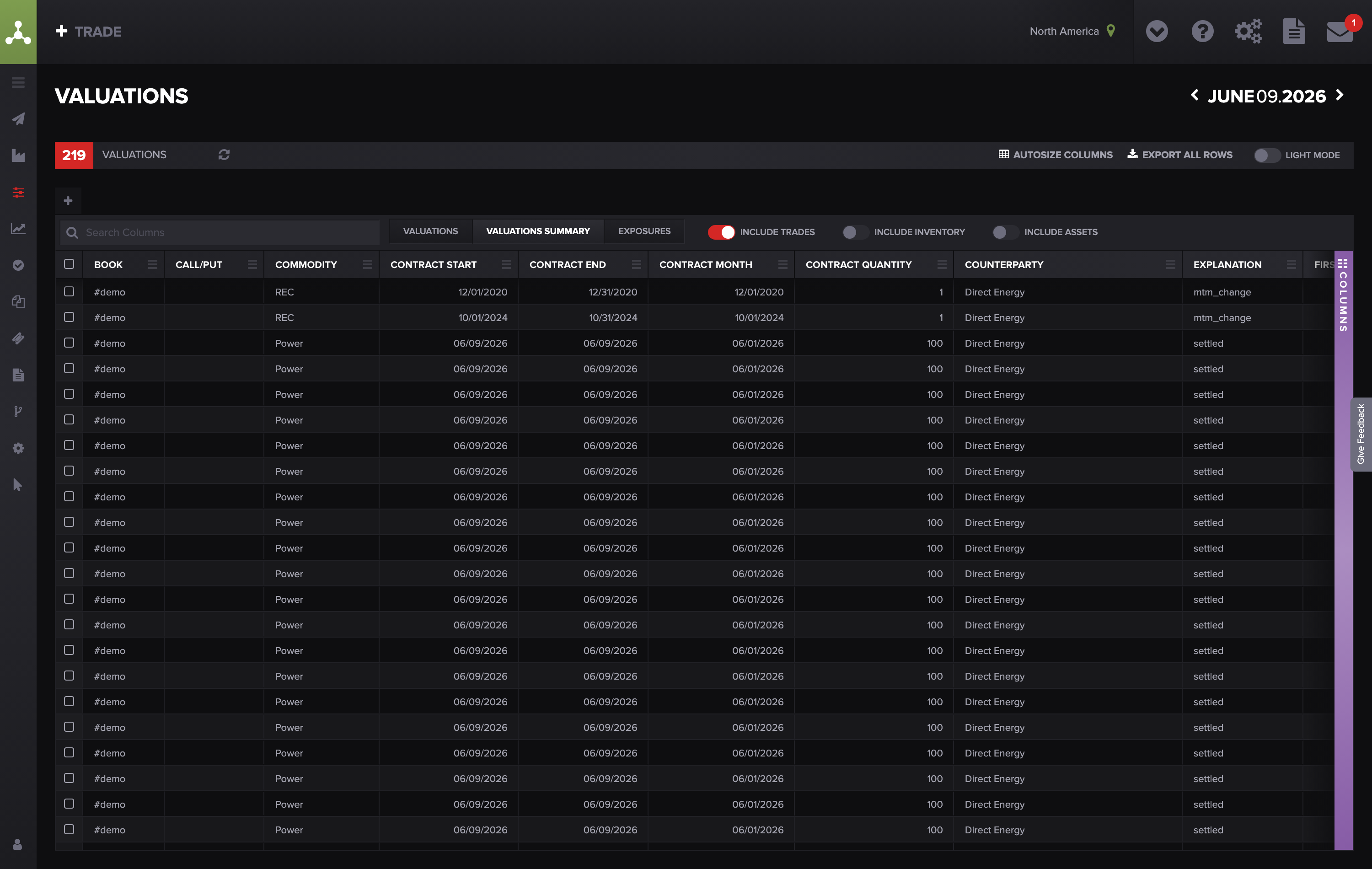
The Valuations screen: the report name (VALUATIONS) is top-left and the as-of date (June 09 2026) is top-right — these are two things to capture, along with the page URL from your browser's address bar.
The Checklist
Work down the symptom that matches your situation.
Symptom 1 — A trade is missing from the report
The trade was voided. Voiding removes a trade from active positions and current valuations, so it drops out of most live views.
Check it: open the trade on the Trades screen and look at its status / Void Date. On the Trades grid, voided trades are shown with a distinct (highlighted) row style, so you can spot them there — there isn't a separate "Void Date" column to filter on.
Fix it: if the void was intentional, this is expected behavior. If it shouldn't be voided, restore it per your process. For how voiding differs from deleting, see "Void vs Delete in Molecule."
The report filters on a tag the trade doesn't have. Many reports only include trades carrying a specific tag — for example, a PPA report that only pulls trades tagged #ppa . (Tags in Molecule start with # .) An untagged trade won't appear.
Check it: open the trade and review its Tags , then compare against the tag the report is meant to include.
Fix it: if the trade is missing a tag it should have, amend the trade to add it. If it's a custom report and you're unsure which tag it filters on, contact us — custom report logic is maintained by Molecule.
The trade isn't linked to the right Agreement. Some exposure and credit reports only include trades linked to an Agreement (the master/credit agreement with a counterparty). A trade with no Agreement, or the wrong one, won't show in those reports.
Check it: open the trade and check its Agreement field.
Fix it: amend the trade to link the correct Agreement.
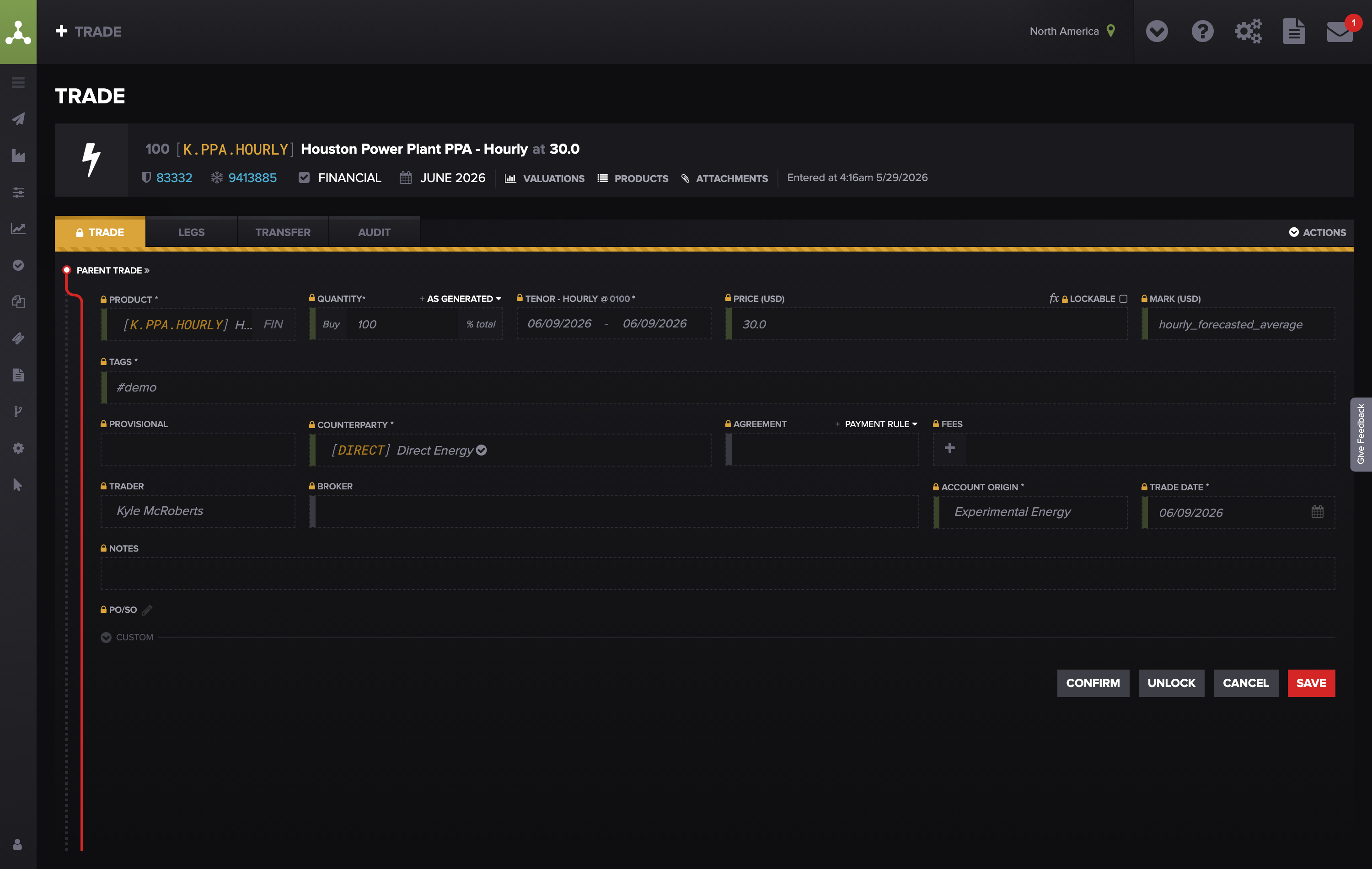
Trade detail showing the Tags (#demo) and Agreement fields — open the trade and review these two fields.
It's an exchange trade that never arrived (or needs reprocessing). Trades executed on an exchange (ICE, CME) or via an ISO/broker flow into Molecule automatically. Occasionally one is delayed or never lands — often a missing product mapping on our side, or post-trade permissions not yet enabled by your broker.
Check it: confirm the trade truly executed and note its exchange/deal ID , product, and trade date.
Fix it: this one's on us. Email support@molecule.io with the exchange deal ID, product, date, and account/book, and we'll reprocess or map it.
The report's date range or history window doesn't reach far enough. A report scoped to a date range won't include trades outside it (for example, prior years).
Check it: re-check the as-of date and any date-range filter.
Fix it: widen the range on a saved Valuations view you control. For a custom report with a fixed window, request a change from Molecule.
Symptom 2 — A row appears that shouldn't
A voided trade is still showing for dates before it was voided. This is usually expected, not a bug. A voided trade keeps its valuation history for as-of dates before the void date so historical P&L stays correct, and extracts pull by as-of date — so those pre-void rows correctly appear.
Check it: note the trade's void date and the as-of date(s) where it shows up. If the as-of date is before the void date, the row is correct.
Fix it: to keep voided trades out of a reporting period, filter your extract on the void date (exclude trades voided in or before the period). If a voided trade appears for dates on or after its void date, that is not expected — send us the trade ID and void date.
A custom report isn't applying an exclusion you expect. Custom reports run on logic and parameters that Molecule builds and maintains — including exclusion rules (e.g., exclude voided, exclude a particular book). If an exclusion isn't applied, the parameter likely needs updating. Check it: identify the exclusion you expected and confirm it's a custom (Molecule-built) report. Fix it: you can't edit custom report parameters yourself. Contact us naming the report and the exclusion you need, and we'll update it.
Symptom 3 — Values look wrong (quantity, price, or P&L)
Molecule calculates value from two inputs: the trade's structure and the market mark (price) for its products on the as-of date. Most "wrong value" cases come down to a missing or stale mark, a fee setting, or a timing/grouping difference. For how positions and P&L are built, see "Trades: Calculating Position and P&L" and "Metrics Molecule Calculates."
No valuation has generated yet — there's no mark for that date. Valuations are event-driven: Molecule values a trade once a mark exists for its product on the as-of date. If there's no mark for that product/date, there's no valuation row.
Check it: in Market Data, confirm a mark exists for the trade's product and contract period on that as-of date.
Fix it: upload (or wait for) the mark; the trade revalues automatically once it lands. See "Valuation & Relevant Products."
You just uploaded a mark — give it a few minutes. Valuation runs in the background, so there's a short lag between a mark upload (or a trade change) and the values refreshing — usually a few minutes, longer during heavy end-of-day uploads.
Check it: re-run the report 5–10 minutes after the change.
Fix it: if values are still stale after ~10–15 minutes, contact support@molecule.io and we'll reprocess the trade. (Note: simply opening the trade and saving it with no changes does not re-trigger valuation — Molecule skips the save when nothing on the trade actually changed.)
A manually entered trade hasn't been saved/re-saved. A trade needs to be saved for valuations to populate; if a freshly entered or amended trade looks blank or stale, a save re-queues it.
Check it: open the trade and confirm it saved cleanly (and isn't locked mid-edit).
Fix it: open in edit mode and save (unlock first if needed); values refresh within minutes.
A fee is set as "flat" vs "unit" (or "contract"). A fee's type changes the math: a flat fee is a single total amount, a unit fee is a per-unit rate multiplied by quantity, and a contract fee is per contract. The same number under the wrong type produces a very different fee on the report.
Check it: open the trade's fee and compare its type against the rate you intended.
Fix it: correct the fee type on the trade. (If a fee was added via an integration/API and isn't showing in P&L at all, a re-save re-triggers the calculation.)
A product setup or mapping was recently corrected. When Molecule corrects a product's configuration (its formula, mapping, or settlement convention), existing trades on that product don't recalculate on their own — they need a re-save or a reprocess to pick up the fix.
Check it: if values are wrong for every trade on one product (not just one), suspect a product-level setting rather than a single trade.
Fix it: contact us to reprocess the affected trades — when Molecule corrects a product's configuration, existing trades don't re-flow into valuations automatically, and re-saving a trade with no changes won't trigger it either. We reprocess affected trades (one or many) on our side.
The mark on that date isn't the level you expect. For a given product/date, the value Molecule uses depends on which mark "wins." Molecule prefers a user-uploaded mark, then a vendor settlement , then an exchange preliminary price, and otherwise copies forward the prior day's price if nothing new arrived. So a value can look "wrong" simply because it's a copied-forward price or a lower-priority mark is in use.
Check it: in Market Data, look at the source of the mark for that product/date — a "copy" source means yesterday's price was carried forward.
Fix it: if you expected a fresh mark, upload it (or wait for the vendor feed) and the trade revalues automatically. Watch your filenames on manual uploads — a file with "estimate" in the name is saved at a lower priority and can be overridden. See Mark Levels .
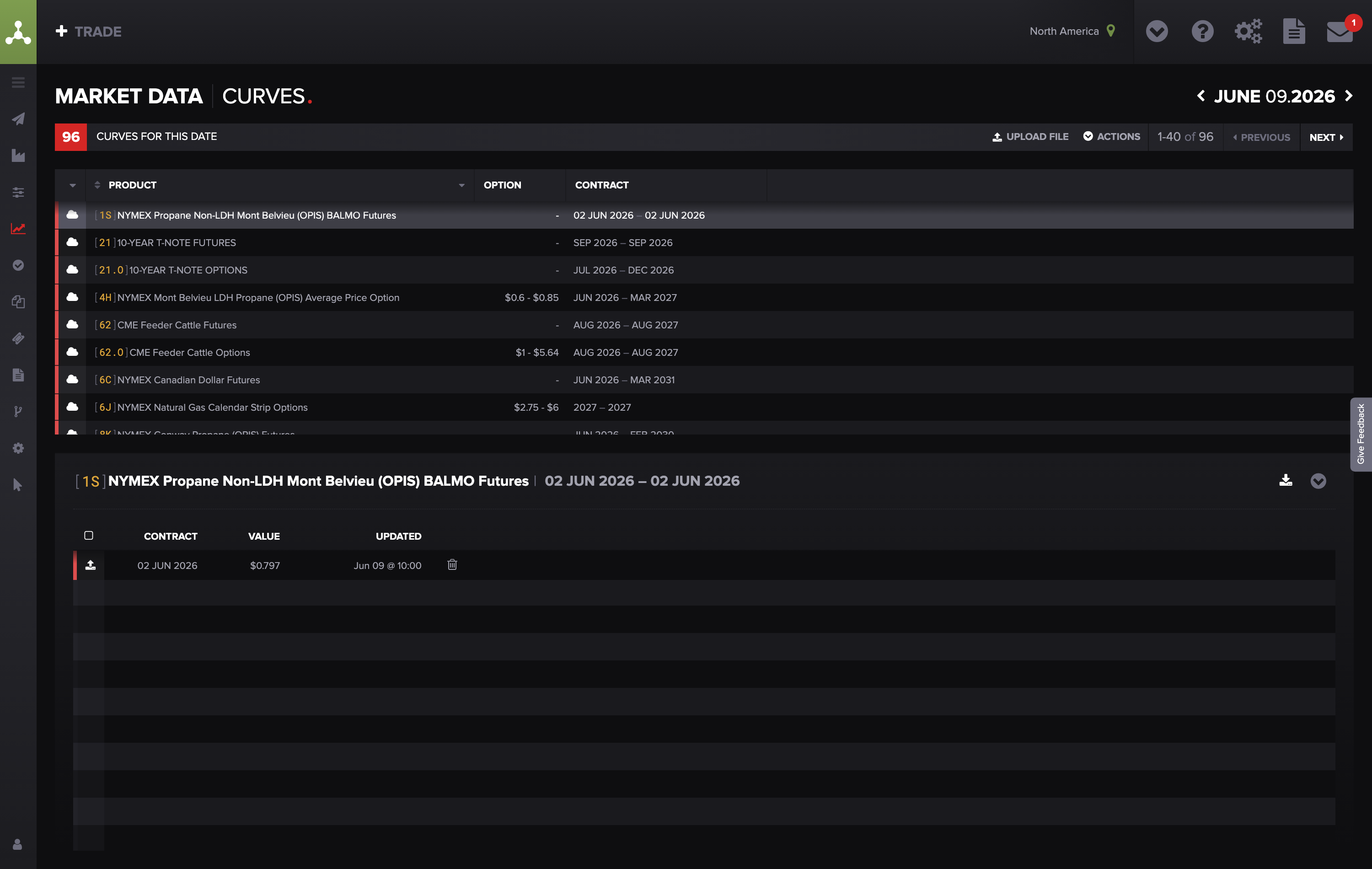
Market Data → drill into a product to see its marks for the as-of date. The leftmost column is the mark's source (user-uploaded / vendor settle / prelim / copied-forward) — check it to tell a fresh mark from a prior-day copy.
You're comparing the Valuations screen to an extract and the rows don't line up. The Valuations screen and a raw-data extract can group rows differently — the screen aggregates rows (for example, by product, contract month, and book), while the extract breaks out legs/sublegs (each delivery period or component). Row counts and subtotals won't match one-to-one even when the underlying data is identical.
Check it: compare totals rather than row counts, and note whether the extract is at leg/subleg grain.
Fix it: aggregate the extract to the same level as the screen before comparing. See "Downloading Raw Data" and "Valuation Outputs."
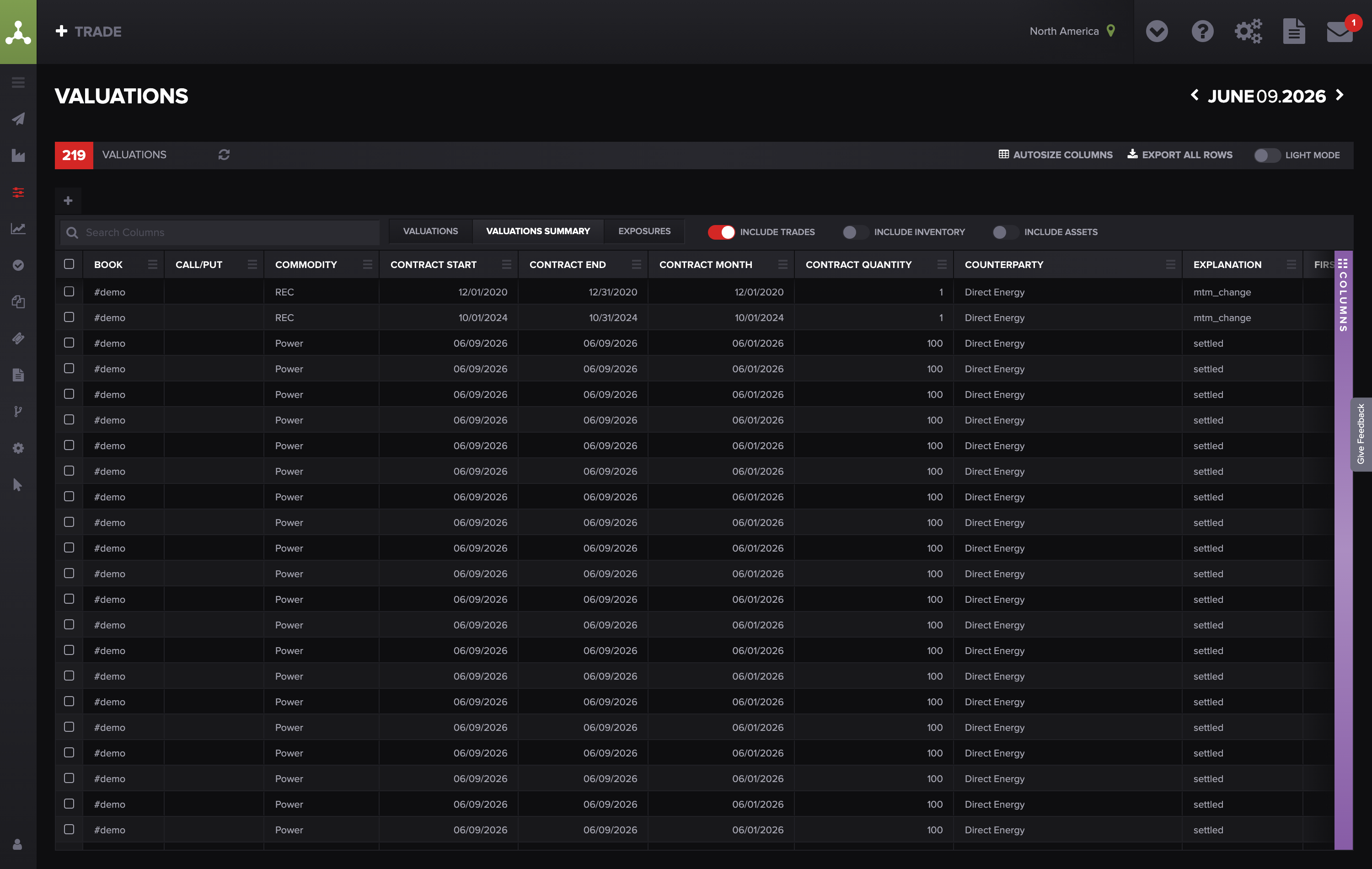
Valuations screen — rows are aggregated (by product, contract month, and book), not one row per trade.
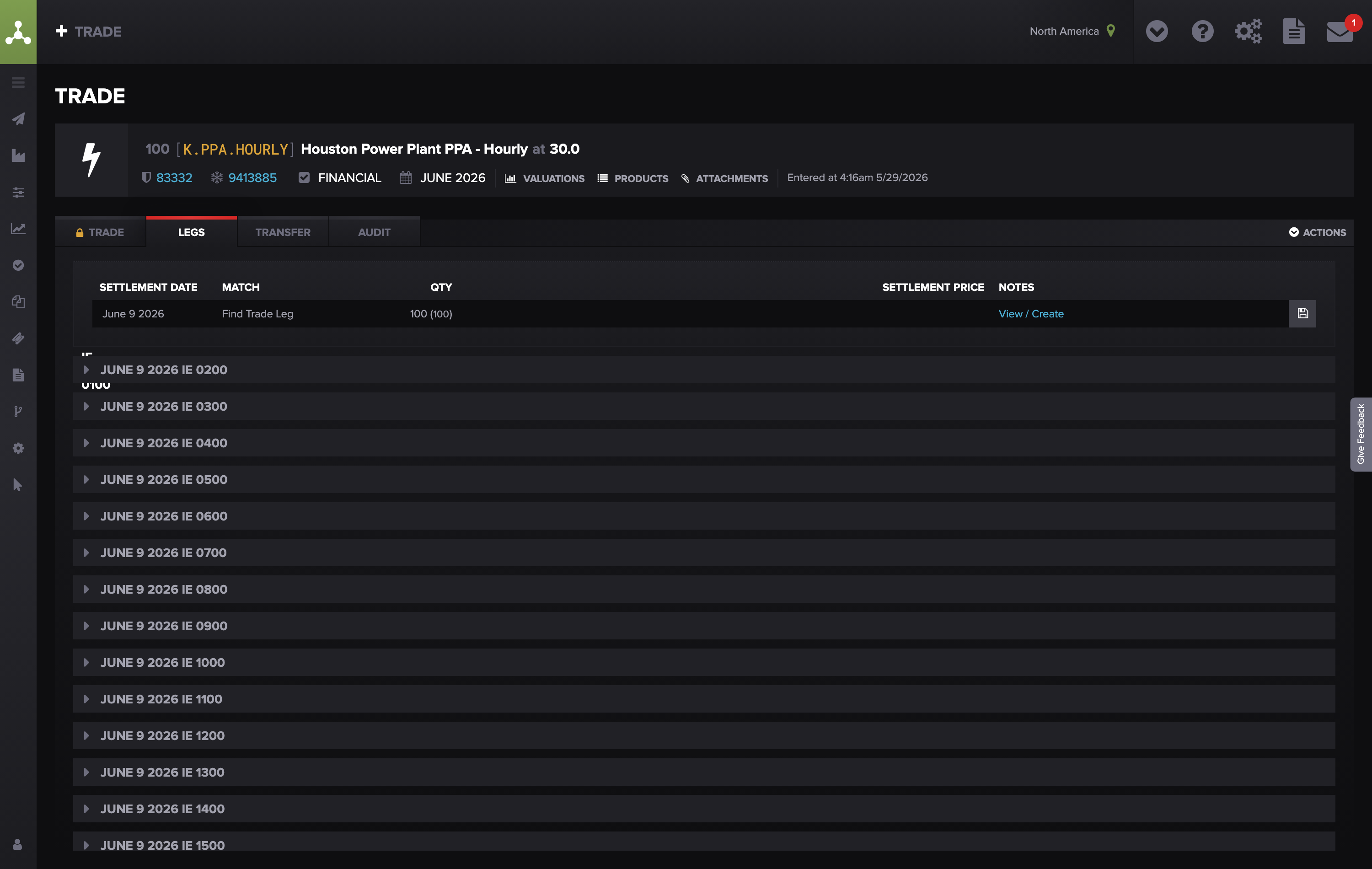
The same trade broken out at leg level (one row per settlement period) — this is the finer grain a raw extract pulls.
The trade's dates don't line up with its delivery period. Molecule values each day of a trade's delivery (tenor) period. If the trade's dates don't align with that period, some days can value as zero or the structure can produce odd values. The most common version: a trade whose trade date is set after the delivery period has already started — the days before the trade date come through as zero, dragging down P&L for those early days.
Check it: open the trade and compare its trade date and settlement date against the start and end of its delivery/tenor period.
Fix it: if the trade date is wrong, correct it (unlock first if needed) and the days rebuild. (Related: if a trade's settlement date doesn't line up with the end of its latest delivery period, there's no dedicated alert for it — you can compare the settlement / realization-date column against the tenor-end column on the Valuations detail view, or in a raw extract, to spot the mismatch.)
If none of these explain it
Email support@molecule.io and include everything from Before you start, plus two extras so we can reproduce it immediately:
The report or extract name (and whether it's a standard or custom report)
The as-of date
One or two example M.IDs , and for each, what you expected vs. what the report shows
A screenshot of the report output showing the discrepancy
The report/extract URL — copy it straight from your browser's address bar

The report/extract URL lives in your browser's address bar — copy this and paste it into your support email so we can open the exact same view.
With those in hand we can pull the exact trade and report on our side and skip the back-and-forth.
FAQs
My trade is gone from the report, but I can still see it on the Trades screen. Did I lose it
No. If the trade was voided, it drops out of active position and valuation views, but its record and full history are preserved. Check the trade's void date. If it wasn't voided, the report is most likely filtering it out by tag, Agreement, or date range — work through Symptom 1 above.
Why does a voided trade still show up in my month-end extract?
Voided trades keep their valuations for dates before the void date, and extracts pull by as-of date — so those pre-void rows correctly appear. Filter your extract on the void date to exclude them from the period. A voided trade appearing for dates on or after its void date is not expected; send us the trade ID and void date.
I uploaded marks but my P&L still looks old. What do I do?
Valuations refresh automatically a few minutes after a mark lands — wait 5–10 minutes (longer during end-of-day bulk uploads) and re-run the report. If it's still stale, contact support@molecule.io and we'll reprocess it — re-saving the trade with no changes won't re-trigger the calculation.
My report and the Valuations screen show different row counts. Which one is right?
Both — they're just grouped differently. The screen aggregates rows (for example, by product, contract month, and book), while an extract breaks out legs/sublegs (per delivery period or component). Compare totals rather than row counts, and aggregate the extract to the same level before comparing.
The numbers in a custom report are wrong. Can I fix the report myself?
Custom reports are built and maintained by Molecule, so you can't edit their logic or filters directly. You can adjust columns and filters on your own saved views on the Valuations screen. For a change to a custom report, contact support with the report name and exactly what needs to change.
Related Articles
If you're still stuck after the checklist above, contact support@molecule.io with the details listed in "If none of these explain it."