Option Expiry, Exercise, and P&S: How Exchange-Financial Positions Resolve
Last updated: October 9, 2026
Exchange-traded futures and options don't sit open forever — they resolve at the end of their life. An offsetting position can be closed early with Purchase & Sale (P&S); an option reaches expiry and is either exercised or abandoned; and when an option is exercised, it turns into an underlying position. This article explains how each of those works — what happens automatically, what you do yourself, what Molecule configures from the exchange's contract spec, and the one action that silently breaks a P&S match.
P&S and option exercise apply to exchange-traded financial products (futures and options). P&S does not apply to physical-delivery trades.
Not covered here
Physical-delivery trades: P&S is for exchange-financial positions, not physical delivery.
A settlement or expiry date that looks wrong → see the settlement-date article.
A position or P&L number that looks wrong → see the P&L diagnosis article.
Part A — Purchase & Sale (P&S)
What P&S is
P&S (Purchase & Sale) is the mechanism for recording that an open position has been closed by an offsetting trade — an equal and opposite trade in the same product and contract period. If you buy 10 of a contract and later sell 10 of the same contract period, your net position is zero (flat). Rather than carry both legs all the way to natural expiry, P&S records that offset and settles the position early, recognizing the realized P&L.
How P&S gets applied
P&S is not a blanket automatic job that silently matches everything overnight. It's applied deliberately, and you can apply it yourself from the trade or option detail view.
Some accounts also have automated P&S processing that Molecule has configured for specific scopes — for example, particular exchanges or clearers. If your account relies on automated P&S and offsetting positions suddenly stop matching, that's a support item: flag it.
What P&S does to your numbers
After you apply P&S, the matched position stops carrying unrealized MTM (mark-to-market — the running gain or loss valued at the current mark) and shows as realized instead:
the contract month's row becomes settled/realized,
its unrealized value goes to zero, and
the net realized P&L is captured as the cash flow for that month.
One timing detail customers often notice: the realized row is dated to the first business day after the contract's expiry — not the date you executed the P&S. So if your realized P&L shows up on a date you didn't expect, this is usually why.
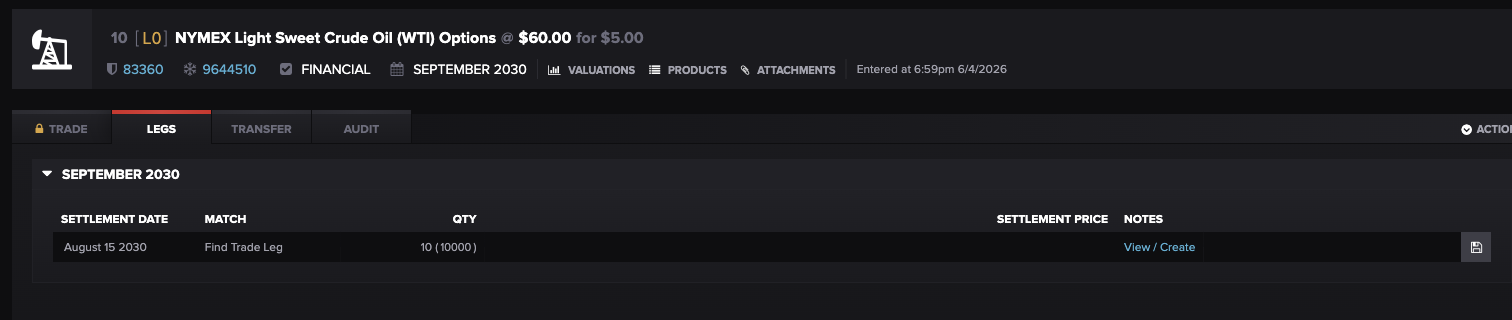
The per-leg P&S view on an option's Legs tab: each contract month shows its settlement date and a Match control ("Find Trade Leg") for pairing the offsetting leg that closes the position. (Alpha demo — NYMEX WTI crude option, September 2030.)
The one action that breaks P&S
⚠ Don't casually resave a P&S-matched trade — it destroys the match. Resaving a trade — opening it and saving with no changes — is a common way to refresh a stale valuation elsewhere in Molecule. But on a P&S-matched trade, resaving destroys the P&S match, and there is no automatic restoration. Before you resave a P&S-matched trade for any reason: document the current matching first (which trades are matched, and at what dates and quantities), perform the resave only if you must, and re-apply the P&S afterward.
This is the one place where the general "resave to refresh a valuation" advice does not apply. If a P&S-matched trade's valuation looks stale, treat it carefully rather than resaving on reflex.
Reversing P&S
If a P&S was applied incorrectly, it can be removed/reversed — the match is undone and the positions return to carrying unrealized MTM as open.
Part B — Option expiry, exercise, and abandonment
At expiry: automatic, manual, or abandonable
What happens to an option at expiry depends on a product setting Molecule configures from the exchange's contract spec. There are three modes:
Automatic exercise: in-the-money options exercise at expiry with no action from you.
Manual exercise: you decide whether to exercise each in-the-money leg; if you do nothing, nothing is exercised.
Abandonable: the option still auto-exercises in the money at expiry by default , but you can step in and manually decline (not take) the future it would exercise into. Because auto-exercise is the default, abandoning requires an explicit action — if you take no action, the future is created.
Moneyness — whether an option is in- or out-of-the-money — is informational. It reflects the current mark against the option's strike (the agreed exercise price) and updates as marks move:
a call is in-the-money (ITM) when the underlying is above the strike, and out-of-the-money (OTM) when it's below;
a put is ITM when the underlying is below the strike, and OTM when it's above.
Manually exercising an option
When automatic exercise doesn't apply, you can exercise an option yourself — that is, convert it into the underlying position. To exercise:
Open the option trade.
Go to Actions → Exercise .
Choose the leg or legs to exercise — exercise is per-leg , so you can exercise some legs and leave others.
Confirm.
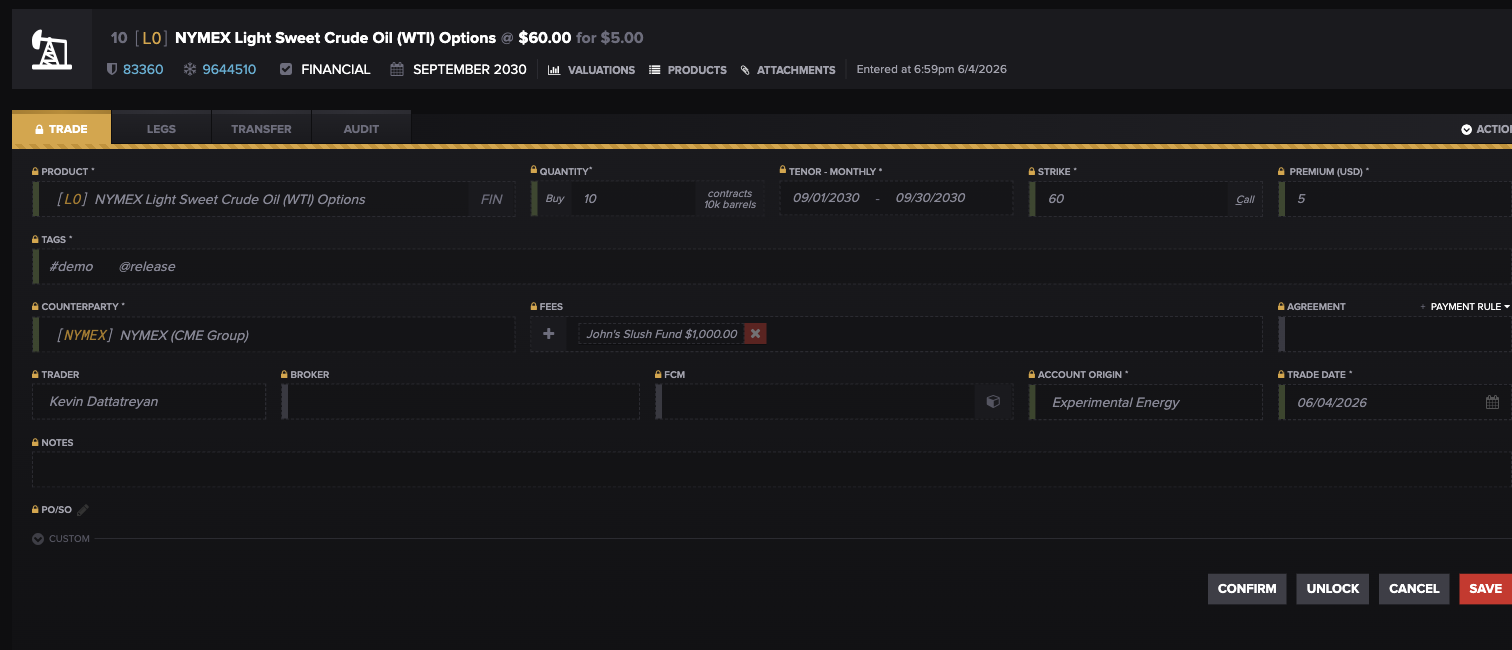
An exchange-traded option in Molecule (a NYMEX WTI crude Call, strike 60, September 2030). Its exercise type — here Financial — is set by Molecule from the contract spec; exercise (per-leg) is launched from the trade's Actions menu, top right. (Alpha demo.)
Abandoning an option
Abandoning an option means declining to take the position it would otherwise exercise into. On an abandonable product, an in-the-money option auto-exercises at expiry by default — abandoning is the active step of telling Molecule not to take the resulting future, so no underlying trade is created. This is available only when the product supports abandonment (another Molecule-configured product setting). Because the default is auto-exercise, doing nothing still creates the future; you must explicitly abandon to avoid it. It's the right choice when exercising isn't worthwhile — for example, when the cost of taking delivery exceeds the option's intrinsic value (its in-the-money amount), even if the option is technically in the money.
What exercising generates
Exercising converts the option into the underlying. What gets created depends on the product's exercise type, which Molecule configures:
Financial: settles in cash, as though you'd bought or sold the underlying financially.
Into a future: creates a futures contract on the underlying, with matching parameters. For a spread option, a spread trade is created.
Physical: exercises into physical delivery of the commodity.
Whatever is generated keeps a read-only link back to the original option (shown as an "Original Option Trade" / "Original Option Leg" reference), so the audit trail and position tracking stay intact.
What you control vs. what Molecule configures
You can: manually exercise or abandon an option (when the product allows), and apply or remove P&S.
Molecule configures, from the exchange contract spec: whether options auto-exercise, what they exercise into (cash, a future, or physical), and whether they can be abandoned. These are not customer-editable.
If an option product is configured incorrectly — say, the wrong exercise type — fixing the product is a support task. And because existing trades don't pick up a product change automatically, they have to be rebuilt to reflect the corrected setting. So if exercise behaves wrong across all trades on a product, report it as a product-configuration issue and expect the existing trades to need rebuilding.
Self-check: what to send support
Before you raise a ticket, a few quick checks — and the details that make the answer fast:
An option behaved unexpectedly at expiry: note the product, the option Trade ID(s) (Molecule's internal trade identifier), whether you expected automatic or manual exercise, and the moneyness at expiry.
Offsetting trades didn't net out: confirm they're the same product and contract period and that P&S was actually applied. If your account uses automated P&S and it isn't matching, flag that.
Exercise is wrong across a whole product: report it as a product-configuration issue covering all trades on the product, and expect the existing trades to be rebuilt.
FAQ
My buy and sell cancelled out — why is the position still showing?
Because P&S isn't a blanket automatic job — it has to be applied. Apply P&S to the offsetting trades, and the position settles and shows as realized. (If your account uses automated P&S and it didn't match, flag it to support.)
My realized P&L from a P&S showed up on a date I didn't expect — why?
The realized row is dated to the first business day after the contract's expiry, not the date you executed the P&S. That's expected behavior.
I resaved a trade and its P&S match disappeared — what happened?
Resaving a P&S-matched trade destroys the match, with no automatic restoration. Re-apply the P&S; next time, document the matching first and avoid resaving a P&S-matched trade unless you have to.
Did my option exercise automatically?
That depends on the product's setting, which Molecule configures from the exchange's contract spec. Some contracts auto-exercise in-the-money options at expiry; others require you to exercise manually. On an abandonable product the option auto-exercises but you can decline the resulting future. If you're unsure how a product is set, ask support.
How do I exercise an option myself?
Open the option trade, go to Actions → Exercise, choose the leg or legs to exercise, and confirm. Exercise is per-leg.
What do I get when an option exercises?
It depends on the product's exercise type: cash (financial), a futures contract on the underlying (into a future), or physical delivery (physical). Whatever's created links back to the original option for tracking.
Related articles
Editor: hyperlink each of these to its help.molecule.io article before publishing (URLs to be confirmed once web access is restored).
If you're still stuck after the checklist above, contact support@molecule.io with the details listed in "If none of these explain it."