How Exchange and FCM Connectors Work
Last updated: October 23, 2026
Overview
Molecule sees every exchange-traded position two ways: a real-time STP feed from the exchange, and a daily statement from your FCM. We book trades from the STP feed and reconcile them against the FCM statement.
Up to four parties are involved: the exchange, your FCM, Molecule, and, if you use one, a front-office trading tool like TT or CQG. Plenty of customers don't use a front-office tool at all and trade directly on the exchange.
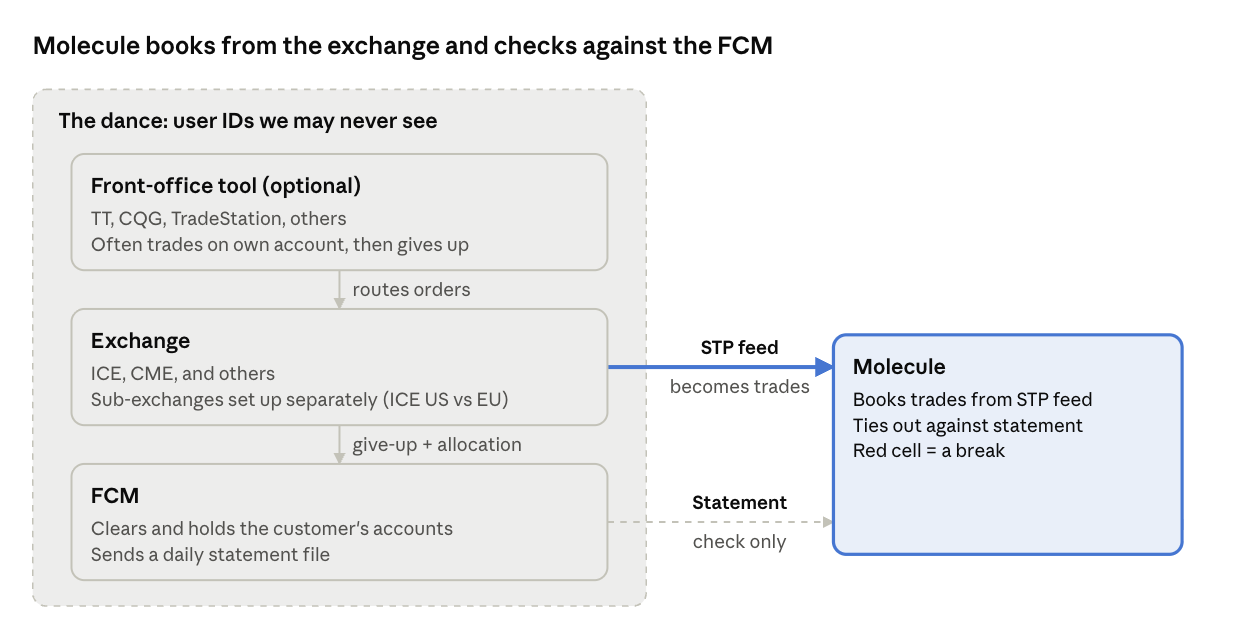
The FCM statement is a simple file drop. The STP feed takes more work, because the exchange, the FCM, and any front-office tool all have to set up matching user IDs before trades flow. We call that coordination "the dance."
Why we do this
We want your positions calculated independently of your FCM. FCMs make mistakes like anyone else, and if we copied their numbers we'd just be passing those mistakes along to you.
For the same reason, we don't usually load trades from FCM statements. If the statement were the source of trades, the reconciliation would always tie out and wouldn't catch anything.
P&L is rarely the problem. Exchange settlement prices are public, so when P&L is off, it's almost always because a position is off.
The two feeds
Feed | Source | What it is | Setup effort | New Adapters |
|---|---|---|---|---|
FCM statement | Your FCM | A daily file with positions & trades | Medium: the FCM sends a file and we parse it -- but setting up credentials and FTP locations sometimes takes a few days | Easy. We have 20+ FCM adapters. Once you start getting statements, a new adapter is a relatively small code change. |
STP (straight-through processing) feed | The exchange (ICE, CME, and others) | A real-time drop copy of every trade on your accounts | Low-Medium (depending on the number of moving parts that you've already set up): the exchange, FCM, and any front-office tool all have to be set up | Harder. We have 5-10 of these; each requires testing and certification. |
Trades in Molecule come from the STP feed. The FCM statement is only used to check them.
The dance
To get an STP feed to Molecule, the exchange and your FCM (and your front-office tool, if you use one) all have to agree on which user IDs and accounts are yours. Each party uses its own IDs.
Some of these IDs are ones we never see. Depending on the setup, they can live:
Between the exchange and the FCM
On an exchange-owned system at the FCM
Between the FCM or exchange and the front-office tool
Inside the front-office tool
All we see is whether trades arrive. If a link is missing, trades just don't show up, and nobody upstream sends an error.
Every route is set up separately
Each combination of exchange and execution path needs its own setup. If you trade directly on one exchange, that's one route. If you trade on ICE and CME, both directly and through CQG and TT, that's six:
CME, directly
ICE, directly (for example, WebICE)
CME via CQG
CME via TT
ICE via CQG
ICE via TT
Sub-exchanges are separate too. ICE US and ICE Futures Europe are different venues, so having one enabled doesn't mean the other is. You can see ICE Europe trades come through fine while ICE US trades on the same tool don't.
Front-office tools add a step
Tools like TT and CQG often trade on their own FCM or exchange account first. The trade then gets given up and allocated to your account somewhere between the exchange and the FCM. That give-up and allocation has to be set up correctly on every side for the trade to show up on your account in the STP feed.
So adding a new execution platform (TT, CQG, TradeStation, or one of the smaller vendors) means setting up a new route.
How long it takes
Fixing a broken route can take anywhere from hours to weeks. It usually involves calls with the exchange, the FCM, and the tool vendor to track down the right IDs and the right people. If you have an introducing broker, they're often the fastest way to get the right people involved.
Reconciliation
The reconciliation screen compares positions from the STP feed against your FCM statement, by account and product. A red cell means the two don't match, which we call a break. The goal is zero breaks.
Two views are worth checking:
Portfolio: open positions as of a date. Use the prior business day, since today's FCM files aren't out yet.
New trades: trades from a single day. A red cell here means something went wrong that day, which makes it the easiest kind of break to track down.
Breaks usually build up over time rather than all at once. The quickest way to fix one is to find the first day it showed up and work forward.
The most common causes:
Cause | What it looks like |
|---|---|
Missing route | Trades are on the FCM statement but never arrive on the STP feed |
Instrument mapping | A product's exchange or FCM code (for example, a GMI code) doesn't map to the right Molecule product |
Account mapping | The trade arrives, but on an account we can't tie to a book |
Our support team reviews reconciliations every day and emails you about breaks. We aim to reach you before you notice them, with what happened, what we're doing about it, and anything we need from you.
Gotchas
Not every break is an error. Sometimes the FCM and Molecule just handle timing or logic differently. Check these first:
FCMs sometimes hold positions an extra day. An expired or closed position can stay on the statement one more day. The break goes away on its own.
P&S logic can differ. Your FCM's purchase-and-sale (offset) logic may change, or may not match ours. Molecule typically offsets same-day trades first, then high-to-low price, then FIFO. If your FCM uses a different order, realized P&L and open lots can differ even when net positions match.
Positions can drop off the statement. Expiries and compressions can remove positions from the FCM statement even though the trades are real.
Sub-exchanges need separate setup. If products on one ICE venue come through and the other's don't, check the sub-exchange setup.
FCM statements aren't always formatted consistently. An FCM might put a master account in the usual account column and the real account number somewhere else, sometimes only for newer accounts. The trade looks missing on the FCM side, but it's actually a parsing issue.
New traders, accounts, and tools need setup. Trades placed before the setup is done won't come through on the STP feed.
What we need from you
Most of this setup happens outside Molecule, so please let us know ahead of time. Email Molecule support before you start trading with:
A new trader
A new account at your FCM
A new FCM.
A new front-office or execution tool (for example, TT, CQG, or TradeStation)
A new exchange or sub-exchange (for example, your first ICE US trades if you've only traded ICE Europe)
A new FCM or exchange we don't yet support -- that usually needs development work on our side. More for exchanges; less for FCMs.
It also helps if your traders or middle office check the prior-day reconciliation screens regularly, ideally daily, and flag anything red they recognize, like a trade they know they placed.
Limitations: ISO markets
This check only works for exchange-traded products. ISOs like ERCOT and PJM publish awards (prices and volumes for cleared bids and offers), but there's no separate statement to reconcile against. The ISO is the only source, and its invoices and credit files aren't broken out by trade. So if an ISO award feed fails, there's nothing to compare against to catch it. We'd like to find a way to check this too.