FX Transactions
Last updated: May 28, 2026
Overview
In energy commodities trading, FX (foreign exchange) transactions are essential for managing exposure to currency fluctuations — especially when physical commodities are priced in USD or other foreign currencies, but your reporting currency is different. Molecule supports three types of FX transactions: FX Forwards, FX Swaps, and Non-Delivering Forwards.These instruments allow you to hedge currency exposure, trade FX directly, and manage foreign exchange risk.
Prerequisites
FX transactions feature enabled on your account
Appropriate trading permissions
Understanding of FX market conventions
Access to FX rate data (spot and forward rates)
Supported FX Transaction Types
Type | Description |
FX Forwards |
|
FX Swaps |
|
Non-Delivering Forwards |
|
Entering FX Transactions
Access FX Trading
1. Navigate to Trading > FX Transactions
2. Click New FX Trade
3. Select Transaction type from the dropdown
FX Trade Entry Form:
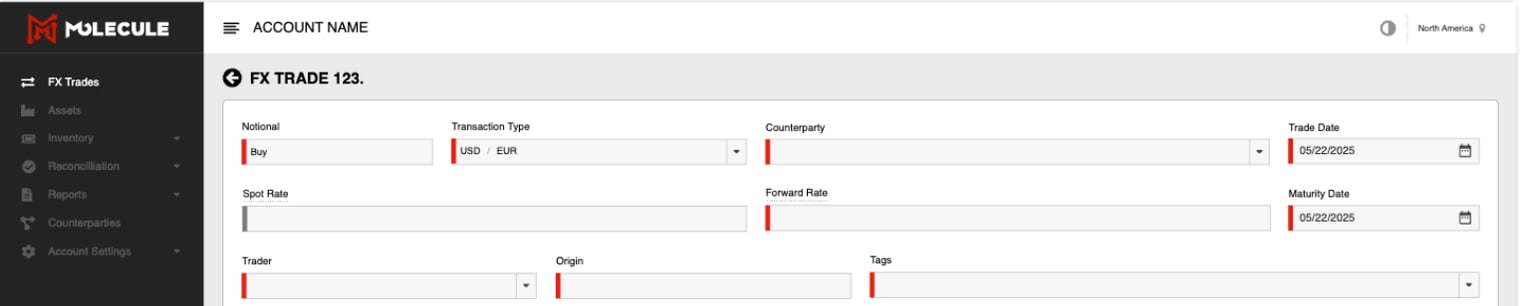
Currency Pair Section |
|
Transaction Details |
|
Rates Section |
|
Settlement Information |
|
Managing FX Positions
FX Trades List
View: All FX transactions in dedicated trades list
Filtering: By currency pair, counterparty, maturity date
Sorting: By trade date, maturity, notional amount
Status: Track trade lifecycle and settlement status
Position Monitoring
Currency Exposures: View net positions by currency
Maturity Profile: See when positions mature
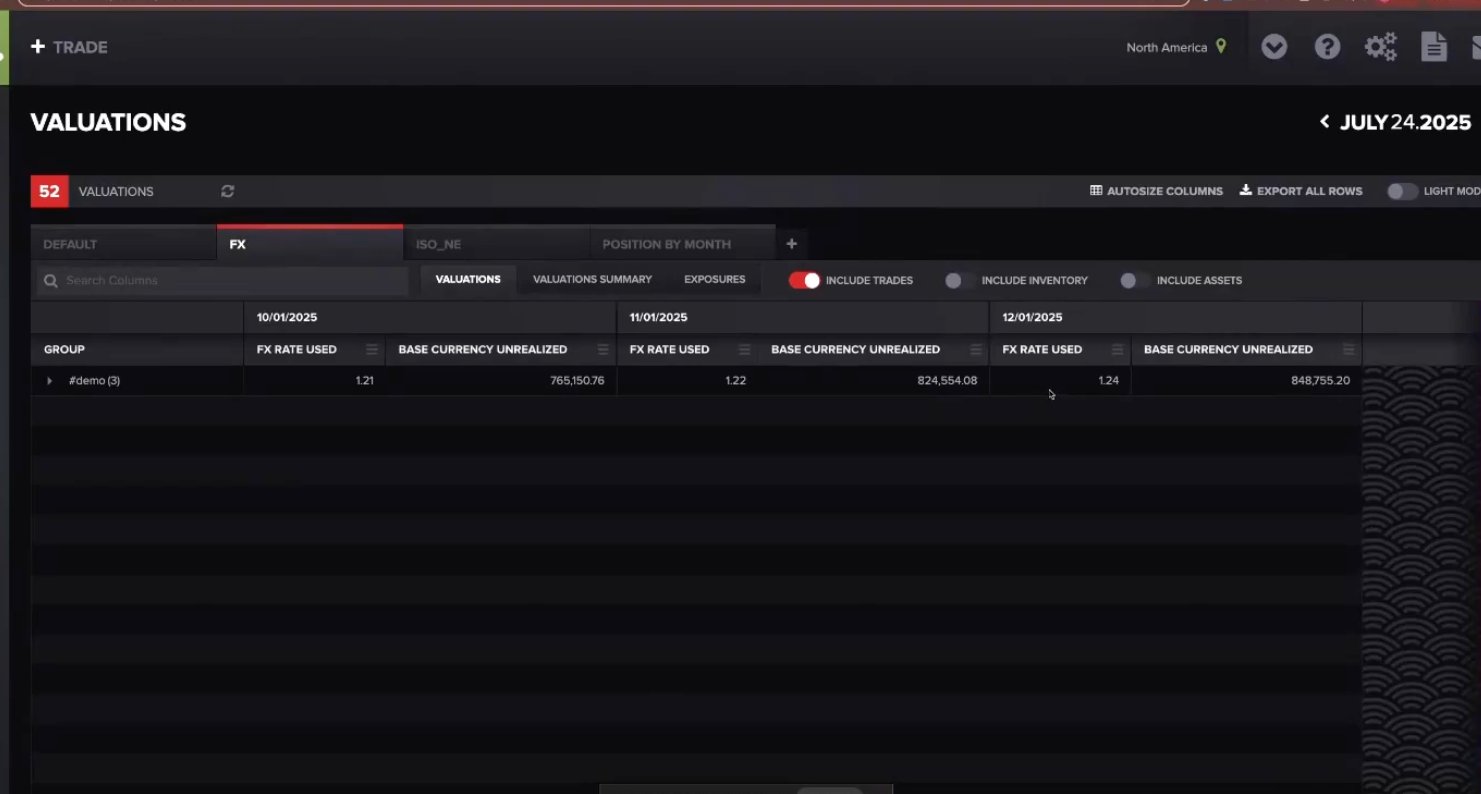
P&L Tracking: Mark-to-market valuation updates
Risk Metrics: Exposure amounts and concentration
FX Valuation and P&L
Valuation Method & Rate Sources
FX transactions use forward rates (not commodity marks) for valuation: P&L = (Current Forward Rate - Trade Forward Rate) × Notional × FX Rate
Sources: Current Forward Rate: From your uploaded forward curves | Trade Forward Rate: Rate entered when trade was booked | FX Rate: Conversion rate to account base currency
Best Practices & Troubleshooting
Best Practices
When entering trades, it is essential to follow a consistent validation process to ensure accuracy and alignment with hedging strategies.
Begin by verifying forward rates against reliable market data sources to confirm pricing integrity.
Next, check that the buy or sell direction of each trade reflects the intended market position.
Carefully validate maturity dates to ensure they align with the hedging timeline of underlying exposures.
Additionally, document the purpose of each trade by applying appropriate tags to identify the associated hedging relationships, which supports auditability and reporting.
From a risk management perspective, maintain regular oversight of currency exposures to
Ensure positions remain within defined risk parameters.
Align the maturities of FX hedges with the tenors of the underlying exposures to avoid mismatches.
To mitigate credit risk, diversify counterparties by distributing trades across multiple banking institutions.
Finally, consistently track profit and loss by monitoring mark-to-market changes, helping to evaluate hedge effectiveness and financial impact over time.
Troubleshooting:
Problem | Solution |
Can't see FX transaction entry | Verify FX transactions are enabled and you have trading permissions |
Rates not updating properly | Check that forward curves are uploaded for your currency pairs |
P&L calculations seem incorrect | Verify forward curve data and check base currency conversion |