Requesting a New Exchange or ISO/RTO Product in Molecule
Last updated: July 1, 2026
Need to trade a contract that isn't in your Molecule yet — a new ICE or CME/NYMEX cleared contract, a new power block, a new ISO/RTO (grid market operator) node or hub, or a new physical gas point? Molecule's team builds new products for you from the specification you provide, so the request itself is the step that matters: a complete, well-specified request turns the build around quickly, while a partial one means follow-up questions and lost days. This article lists exactly what to send so you get it right the first time.
One thing to know up front: new products are built by Molecule, not self-served. You may see a read-only product list under Settings → Products (only custom fields can be edited there), but there is no way to create a product from your side — the creation interface (Master Data → Products → New Product) lives in Molecule's staff-only admin area, which customer accounts can't access. So this is a guide to requesting a product — not building one.
Not what you need?
A product already exists but its specs are wrong (wrong block, wrong divisor) → same request channel, but say "this existing product is wrong," not "new product" — it's a correction.
A trade isn't flowing in from the exchange feed → see the exchange-trade-feed troubleshooting article.
Prices/marks are missing on a product that already exists → that's a price-feed issue (separate article).
You need a bilateral/OTC product → same request channel; this article focuses on exchange and ISO/RTO products.
What we need from you
Copy the checklist below into your request and fill in what you know. You don't need every field — but the more complete it is, the faster we can build and verify the product.
Identify the product
Product name / ticker you'd like it called in Molecule.
Commodity — the underlying (e.g., natural gas, power, crude, emissions).
Instrument type — future, swap, forward, or option.
Exchange or ISO/RTO it trades on (e.g., ICE, CME/NYMEX, Nodal, PJM, ERCOT).
Exchange contract symbol / ticker , as the exchange lists it — plus any clearing or logical code (for example, the code your clearing broker/FCM uses) if you know it.
Units & shape
Unit of measure (e.g., MMBtu, MWh, MT, BBL, Therm).
Currency (USD for most US products; EUR or GBP for some European ones).
Default frequency — should trades generate monthly , daily , or hourly legs?
Block type (power) — e.g., 5x16, 7x16, 2x16H, 7x8.
Lot size / contract size , if you know it (the number of units per lot or contract).
Pricing & settlement
The price curve/mark it should value against — a vendor feed name (e.g., a Morningstar or Platts curve), a mark you'll upload yourself, or simply "same as [existing product]."
Settlement rule — when each contract period settles (e.g., "last business day of the contract month," or "three business days before the contract month"). Give the day count, the business-day convention, and the reference date.
Business-day calendar that applies (e.g., CME, ICE, NERC, UK), if you know it.
Historical marks (optional) — if you need marks loaded for past dates so backdated trades value, say so and from what date.
Continuation context (helps us route it fast)
If this extends an existing series or a prior request, include the earlier ticket number and the name of a similar existing product we can use as a model.
Example of a complete request
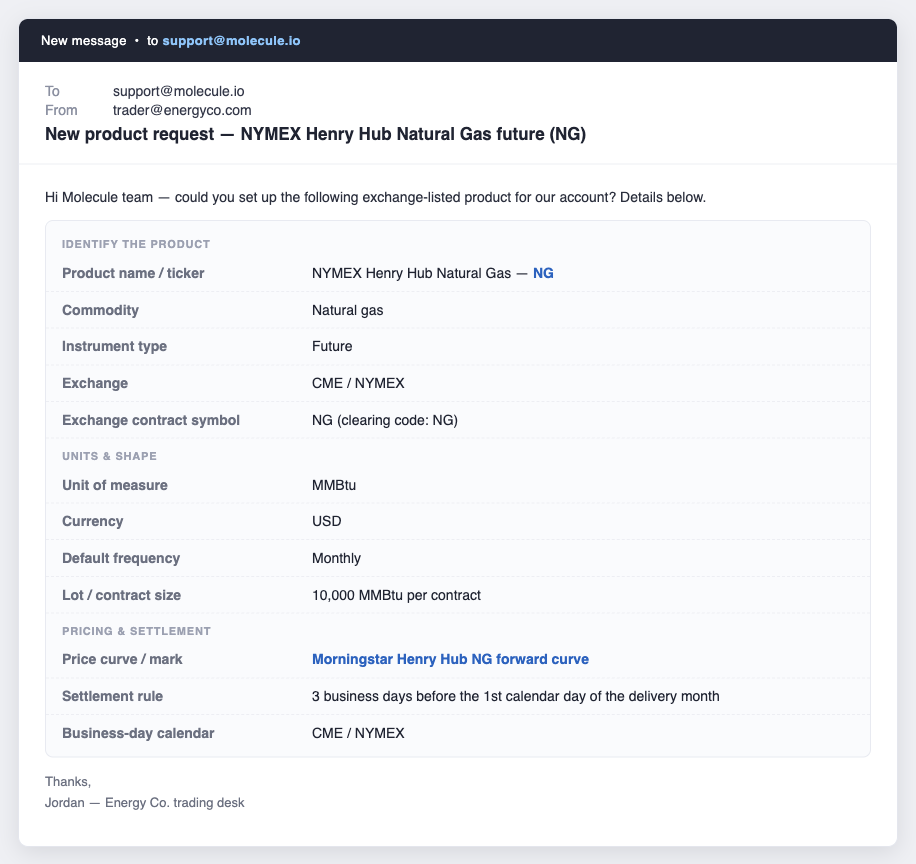
A complete request names the product, its units and shape, and — crucially — the price curve it should value against. Alt text: An example product-request email with the checklist fields filled in.
Pricing & settlement — don't skip this
This is the part most often left out, and it's the one that causes a second round-trip. If no price curve is configured, the product won't generate valuations — trades will book, but they won't mark or show P&L. So naming the intended curve up front (a vendor feed, a mark you'll supply, or "same as [existing product]") is the single biggest thing you can do to avoid delay. If you're not sure which curve is right, tell us how you expect the product to be priced and we'll help map it. For more on how marks drive valuation, see "Mark Levels" and "Valuation & Relevant Products."
The product valuing once it's live
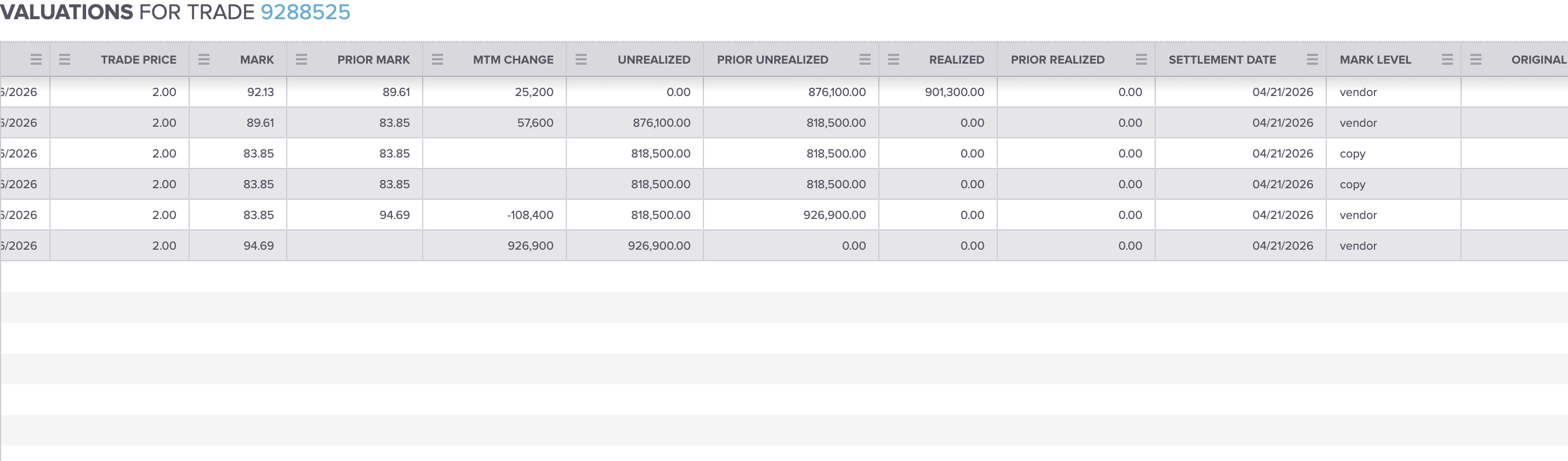
With a price curve configured, a trade on the new product marks and shows P&L; with no curve it would book but not value. Alt text: A trade's Valuations view showing populated mark and unrealized-P&L rows.
What happens next
Once you submit, Molecule's team configures the product, books a test trade against it, and verifies it values and settles correctly before it's made available to you. Straightforward listed futures are quickest; some configurations take longer because they involve additional review — for example, a new physical gas product with a pricing formula, mapping a new ICE physical gas symbol, or adding a new pipeline or hub delivery point.
Turnaround depends on the complexity of the product and the testing involved, so there isn't a single fixed time — ask your support contact for an estimate when you submit.
How to submit
Send your request — with the checklist above — to support@molecule.io (or through your usual Molecule support channel). Include as many fields as you can; we'll follow up only on anything that's missing. [SME VERIFY: the current public article references a product-setup web form, but internal guidance is that requests come through the normal support channel and the form is not confirmed as the official intake path. Confirm the one correct channel before publishing and use only that; until then, this article directs customers to support@molecule.io.]
FAQ
Can I set up the product myself?
No. You can see a read-only product catalog under Settings → Products (only custom fields are editable there), but it has no "create product" option. Product creation is admin-only and is done by Molecule's team. Send us the specification above and we'll build it, test it, and confirm when it's ready.
How long does it take?
It depends on the product. A standard listed future is quick; products that need a pricing formula, a new exchange-symbol mapping, or a new delivery point take longer because of the extra review and testing involved. Ask your support contact for an estimate when you submit — there's no one-size-fits-all time.
I need a power block product — what do you need?
Tell us the block type (e.g., 5x16, 7x16, 2x16H, 7x8) along with everything else in the checklist. Block type is a common source of valuation surprises, so be explicit — don't assume a daily product matches the equivalent monthly one.
The product exists but the specs are wrong — same process?
Yes, same channel — just flag it as a correction to an existing product (e.g., "the block on X is wrong"), not a new product. Tell us the product and exactly what's wrong; product specs are maintained by Molecule, so we'll make the change.
Will it value automatically once it's set up?
Only if a price curve is configured. A product with no mark curve will book trades but won't generate valuations, so name the curve you want it priced against in your request. Once a curve is set and marks are available, valuations appear on your trades.
Related articles
Editor: hyperlink each of these to its help.molecule.io article before publishing (URLs to be confirmed once web access is restored).
If you're ready to request a product, send the checklist above to support@molecule.io.