My Settlement or Expiry Date Is Wrong: Causes and How to Correct It
Last updated: October 9, 2026
When a trade's settlement date — the date its position settles — or its expiry date looks wrong, it's almost always driven by one thing: the product's settlement rule. This article explains what actually sets the date, how to fix the common single-period case yourself, when it has to be escalated, and a quick self-check you can run to catch the problem before it reaches settlement. (Expiry — the date an option or futures contract expires — is derived the same way, from the product's rule and calendar.)
First, the common confusion: it's the product's settlement rule, not payment terms
Settlement dates in Molecule are derived from the product's settlement rule — not from payment terms. This trips a lot of people up: when a settlement date is wrong, the instinct is to reach for payment rule terms to fix it. That won't work. Payment rule terms govern when payment is due; they don't change the settlement date itself. The settlement date comes from the rule and the calendar configured on the product. So if you change a payment term and the settlement date doesn't move, this is why — see "Payment Rule Terms" for what those actually control.
Because the settlement rule lives on the product, it applies to every trade that references that product. That single fact explains most of what follows.
What causes a wrong settlement or expiry date
There are three common causes. Two of them affect every trade on a product; the third affects only certain dates.
1. The product's settlement rule doesn't match the contract spec. The settlement rule is what turns a delivery period — the span of time a contract covers, for example a calendar month — into a settlement date. If the rule on the product doesn't match the exchange or OTC convention the contract should follow, the date comes out wrong — and because the rule is on the product, it's wrong the same way on every trade referencing that product. That's the signature of a systemic problem, not a one-off.
2. The wrong business-day calendar is assigned. A business-day calendar is the set of dates that count as business days when the rule is applied (exchanges differ on which days are holidays). If the product is using the wrong one — say, a CME calendar where an ICE calendar belongs — the settlement dates come out off specifically on the days where the two calendars differ.
3. A calendar holiday mismatch. Even an otherwise-correct calendar can occasionally miss a specific holiday, producing a one-day discrepancy on just those dates rather than across the board.
How to tell which one you're dealing with:
Every trade on the product is off → cause 1 or 2 (the product's rule or its calendar). This is systemic and needs the product corrected.
Only certain dates are off → cause 3 (a holiday mismatch).
Only one trade is off → likely a trade-level case you can fix yourself (next section).
How to correct it
A single trade covering a single period — you can fix it yourself. If the wrong date is on a trade that covers one delivery period, the trade supports a settlement-date override: open the trade, set the override date, and save. This is the fastest fix for a genuine one-off.
Open the trade.
Go to the Legs tab and set the leg's Settlement Date to the correct date.
Save.
Confirmed: On a single-period trade the override is the editable Settlement Date value on the trade's Legs tab — a single-period trade has exactly one leg, so editing that leg's Settlement Date is the override (stored as settlement_date_override on the trade).
A multi-period trade — the override isn't available. A standard trade that spans multiple delivery periods can't take a trade-level settlement-date override. Don't go hunting for one on those trades — the fix is to correct the underlying product rule (below). (Exception: Park & Loan (PAL) trades can carry a settlement-date override even on a multi-period tenor — this keeps both sides of the deal valued for its full term. PAL is the only standard exception to this rule.)
The product's settlement rule is wrong — this is an escalation, in two steps. You can't edit a product's settlement rule or its calendar yourself; product settlement rules are maintained by Molecule, so report it (see "What to send support"). Two things then have to happen, and it's worth knowing both up front:
Support corrects the product's settlement rule (or calendar).
Existing trades are re-saved or reprocessed to pick up the change. Correcting the rule does not automatically update trades already booked — those keep the dates they were given under the old rule. Each affected trade has to be re-saved to rebuild its settlement dates; for a handful that's done one at a time, and for many, support reprocesses them in bulk.
Fixing the rule alone leaves your existing trades wrong — so for a systemic problem, ask for both halves.
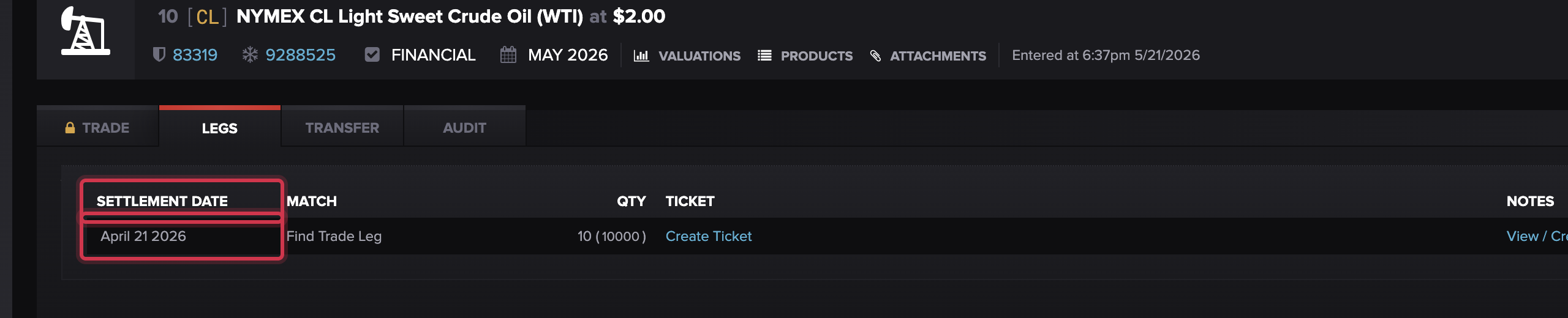
For a one-off on a single-period trade, set the leg's Settlement Date on the Legs tab and save.
Catch it yourself: settlement date vs. Contract End
There's no automated alert for a settlement-date mismatch — a wrong date won't throw an error at trade entry or valuation; it usually surfaces at settlement or in reconciliation. But you can catch it yourself with a quick comparison.
On the Valuations detail view (or in a raw extract), compare the Settlement Date column against the Contract End column — Contract End being the end of the delivery period the entry covers. If a trade's settlement date doesn't line up sensibly with the end of its delivery period, that's your red flag. Run this comparison across all the trades on a product — especially right after a new product goes live — and you'll catch a systemic rule or calendar problem early, instead of discovering it at month-end.
Confirmed column labels on the Valuations detail view: Settlement Date and Contract End (the delivery-period end); Realization Date is also available. There is no "Tenor End" column on the Valuations view — "Tenor End" exists only on the Trades grid, which is why the comparison here uses Contract End.
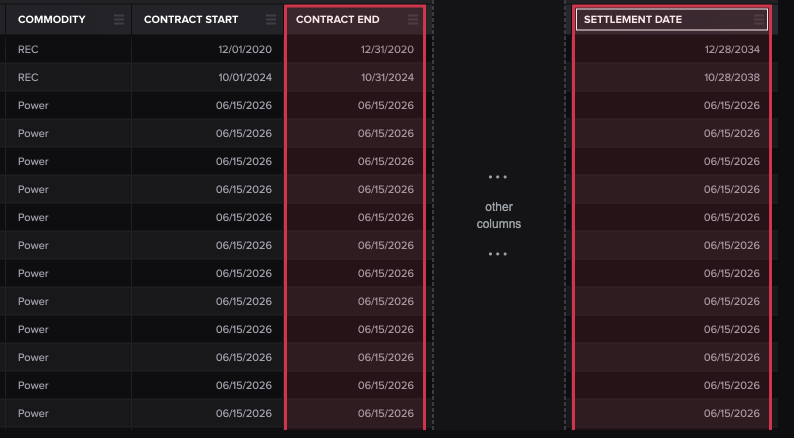
Compare each trade's Settlement Date against its Contract End; a date that doesn't line up sensibly is the red flag. (Note the REC rows above — settlement dates land years after the delivery period ends, an obvious misconfiguration — while the daily Power rows line up exactly.)
What to send support
For the escalation cases, include:
the product name — and whether it appears to affect all trades on the product (that points to a product-rule or calendar fix, not a per-trade one);
one or two example Trade IDs with the wrong date and the correct date ;
which exchange's contract spec the dates should follow (so the right settlement rule and calendar can be set);
whether the trades are single- or multi-period ;
if it's systemic, ask for both the product-rule correction and reprocessing of the existing trades.
FAQ
Every trade on this product has the wrong settlement date — why?
The settlement rule lives on the product, so it applies to every trade referencing it. If the rule (or the product's business-day calendar) doesn't match the contract spec, every trade comes out wrong the same way. That's a systemic fix: support corrects the product, then existing trades are reprocessed to pick it up.
Can I just fix the date on the trade?
If the trade covers a single delivery period, yes — set the Settlement Date on the trade's Legs tab and save. If it spans multiple periods, there's no trade-level override; the product rule has to be corrected instead. (The one exception is Park & Loan (PAL) trades, which can take an override even on a multi-period tenor.)
I changed the payment term but the settlement date didn't change — why?
Because the settlement date comes from the product's settlement rule, not from payment terms. Payment rule terms control when payment is due, not the settlement date. To change the settlement date, the product's rule — or a single-period trade's override — is what matters.
Support fixed the product but my old trades are still wrong — why?
Correcting the product rule only applies to new settlement entries. Trades already booked keep their old dates until they're re-saved or reprocessed to rebuild their settlement dates. Ask support to reprocess the existing trades as the second half of the fix.
How can I catch this before settlement?
There's no automated alert, but you can compare the Settlement Date against the Contract End (the end of the delivery period) on the Valuations detail view or in an extract. If they don't line up sensibly, that's the flag — run it across a product's trades after go-live to catch a systemic issue early.
Related articles
Editor: hyperlink each of these to its help.molecule.io article before publishing.
If you're still stuck after the checklist above, contact support@molecule.io with the details listed in "If none of these explain it."