Pricing Formulas: How They Work, Where You Write Them, and Getting Advanced Formulas Right
Last updated: July 1, 2026
A pricing formula prices a trade by reference to one or more market indices — for example, "Henry Hub plus $0.25" rather than a flat price. This article explains how a formula-priced trade actually values, where you write a formula during trade entry, the documented building blocks, and — for anything more advanced — the right way to get the exact syntax confirmed. The existing "Pricing Formulas" article covers the basic syntax and the best() function; this one focuses on the semantics and the harder cases.
How formula pricing works
At trade entry, a formula is just a set of references — it doesn't carry a price yet. The price is computed later, at valuation time:
The engine looks up the current mark (the current market value) for each product the formula references, for the relevant contract period and as-of date.
It evaluates the formula expression (or, for legacy formulas, sums the weighted components).
It applies any configured alpha adjustment (a basis or differential — more below).
It returns the computed price, which becomes the trade's value for that date.
Two consequences follow directly:
A formula-priced trade's value moves as the referenced products' marks move — that's usually the answer to "why did my formula-priced trade's value change?"
If a referenced product has no mark for the as-of date, the formula can't resolve to a value, and that date's valuation won't carry a price. (The engine first falls back to the most recent earlier mark for that product; only if none exists does it come up empty.) When that happens, see the P&L/valuation diagnosis article and the stale-prices article.
Where you write a formula
You write a formula on the trade, during trade entry, at the pricing step (Step 3: Set Pricing). How you enter it depends on which formula parser — the engine that reads and evaluates the formula — the product uses:
V2 (current): you type the expression as plain text into the Price Formula field. There's no picker or component editor — just the expression.
V1 (legacy): the formula is built in a UI component editor (the Price Formula Model), where each component is a percentage-weighted reference to a specific product and contract period.
Separately, every trade also has a Marking Formula — the formula used to compute the trade's mark (its market value for MTM). It's configured independently from the trade-price formula, because a trade can be priced against one index but marked against another. For most trades you don't need to set one — the mark comes straight from the product's market data — but entering a trade-level marking formula overrides that standard mark lookup for that trade. (Some product types, such as FX, require a marking formula at entry.)
The boundary that matters: you write the formula on the trade, but the product — including which parser it uses and any product-default formula — is configured by Molecule. Product setup is admin-only. So "change my product's default formula" or "switch this product's parser" is a support request, not something you edit on a trade.
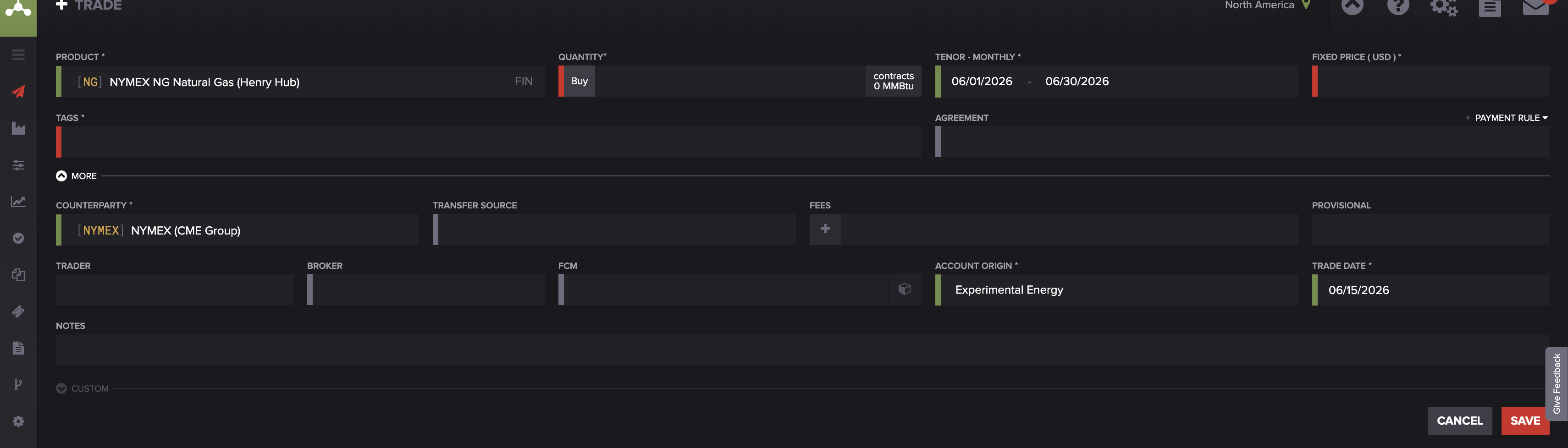
Trade entry for a V2 product (NG / Henry Hub). On V2 (the current standard), pricing is a single plain field — you type the price, or a formula expression, directly into it. There is no component builder and no alpha-type toggle; alpha is always flat. (Contrast this with the V1 component editor below.)
V1 vs V2: what to know
V2 is the current standard — all new formula-priced products use it. It's a text expression language that supports referencing products by short name , date-specific contract lookups, mathematical operators, and built-in conversion functions. In V2, alpha is always flat — a fixed dollar-per-unit amount; percentage alpha is not supported.
V1 is legacy (not recommended for new setups): a structured set of percentage-weighted components built in the UI component editor. It supports both flat and percentage alpha.
The product decides. Which parser a trade uses is set entirely at the product level — there's no per-trade parser choice. If you need a product moved from V1 to V2, that's a support request.
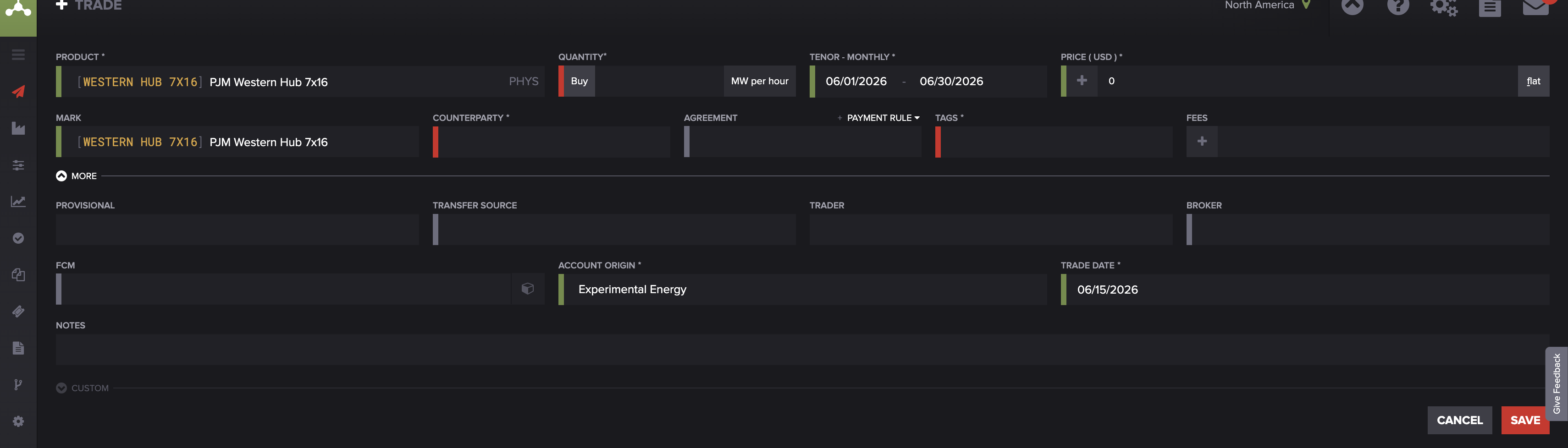
Trade entry for a legacy V1 product (PJM Western Hub). On V1 the price field is a component builder: the green + button adds a percentage-weighted component, and the flat control toggles the alpha type (flat or percentage) — neither of which V2 exposes. The Mark row beneath shows the trade's marking formula.
The building blocks that are documented
A few constructs are well-defined and safe to rely on. For anything outside them, confirm the exact syntax with support (next section) rather than guessing.
best(). Selects the best available mark for a referenced product according to Molecule's mark-source priority (fresh sources before carried-forward ones). It's covered in the existing "Pricing Formulas" article and "Mark Levels" — see those for usage.
Alpha (the adjustment). A numeric adjustment on top of the formula price, representing a basis or differential. Flat alpha adds a fixed amount (a flat 0.10 on a $2.50 mark → $2.60); percentage alpha adds a percentage of the mark (5% on $2.50 → $2.625). Remember: V2 supports flat alpha only.
Spreads (minuend − subtrahend). A spread prices a trade as the difference between two products' prices — a minuend (the price subtracted from) minus a subtrahend (the price subtracted). This covers calendar spreads (the same product in two different delivery periods) and location differentials (two products at different delivery points — for example, Henry Hub minus Chicago Citygate). One thing to know: spread-priced products are configured at the product level, and trades on them inherit the spread pricing — so setting up a basis/location or calendar spread product is a Molecule product request, not a trade-level edit.
Product references, operators, and conversions (V2). As an illustration of the shape these allow, an expression that references the February 2025 Henry Hub mark and adds a 15-cent basis looks like "NG"(2025-02) + 0.15. Treat that as a shape, not a specification — for exact syntax beyond such basics, confirm with support.
Provisional price. For physical trades that price over a quotational period (an averaging window used to set the final price), a provisional (preliminary) price is used until final pricing is determined.
Advanced formulas: work with support
Molecule doesn't publish a complete, self-serve catalog of formula functions — so for anything beyond the building blocks above (averaging over a quotational period, complex basis or location logic, trigger-date-based calculation, or any function you're not certain of), the right path is to work with support to confirm the exact supported syntax and to validate that the formula produces the price you intend. That's the normal, expected route for advanced pricing — not a sign anything's wrong. Guessing at a function name risks a formula that's syntactically valid but prices incorrectly, with no error raised.
Checking your formula
There isn't a standalone formula preview, so the practical way to validate a formula is to enter it on the trade, save, and check the resulting price and valuation. If the valuation looks stale after you edit the formula, resave the trade — open it in edit mode and save with no changes — to force a recompute; values typically refresh within a few minutes. (The P&L/valuation diagnosis article covers the resave step in detail.)
FAQ
Why did my formula-priced trade's value change?
Because a formula's references resolve to the current marks at valuation time — so as the underlying products' marks move, the computed price moves with them. If the value dropped to nothing, a referenced product may have no mark for that as-of date.
Where do I enter a formula?
On the trade, at the pricing step of trade entry (Step 3: Set Pricing). On V2 you type the expression into the Price Formula field; on legacy V1 products it's built in a component editor.
What's the difference between V1 and V2?
V1 is the legacy component editor (percentage-weighted components, flat or percentage alpha); V2 is the current text-expression language (product references, operators, conversions, flat alpha only). You don't choose — the product decides which parser is used, and moving a product from V1 to V2 is a support request.
How do I write a location or basis spread?
A spread is a minuend minus a subtrahend — for example, Henry Hub minus Chicago Citygate for a location differential, or the same product in two delivery periods for a calendar spread. Spread-priced products are set up at the product level, so to get one configured, request it from support.
How do I do an average-over-the-month price?
That's an advanced case (a quotational/averaging period). Don't guess at the syntax — confirm the supported approach with support so the formula values the way you intend.
Related articles
Editor: hyperlink each of these to its help.molecule.io article before publishing (URLs to be confirmed once web access is restored).
If you're still stuck after the checklist above, contact support@molecule.io with the details listed in "If none of these explain it."