Understanding Inventory and Asset Mark-to-Market: Quantities, MTM, and P&L
Last updated: July 6, 2026
This article explains how inventory and physical-asset positions are quantified, marked, and turned into P&L in Molecule — and it clears up the confusion that drives most of these questions: the difference between unit quantity and priced quantity on a valuation row. If your inventory shows no MTM, your asset P&L "jumped," or a quantity looks wrong, the section that matches your symptom will usually explain it.
Quantities: unit vs priced vs decayed
Three different quantity numbers can appear on the same valuation row, and they answer three different questions. Conflating them is the most common source of "why is this quantity wrong?" tickets, so it's worth separating them cleanly.
Unit quantity (unit_quantity) — the position quantity in the product's own unit of measure: MWh, MMBtu, barrels, and so on. This is simply how much you hold or owe, in physical units. It's the most straightforward of the three.
Priced and unpriced quantity (priced_quantity, unpriced_quantity) — for a physical or commodity trade that prices over a quotational period (the fixing or averaging window over which the price is set), this splits the quantity into the portion that has been priced so far versus the portion still awaiting pricing. For formula-priced entries it is pro-rated by how far through the fixing period you are:
priced_quantity = quantity × (priced_days / total_days)
unpriced_quantity = quantity − priced_quantity
A pricing status (pricing_status) flags the row as fully priced, partially priced, or unpriced. The key idea: priced vs unpriced is about progress through the quotational period — how many of the averaging days have fixed.
Worked example: a cargo prices on the average of a 30-day fixing window. Ten days in, 10 of 30 days have fixed, so priced_quantity is one-third of the quantity and unpriced_quantity is the other two-thirds. As more days fix, priced rises and unpriced falls until the period closes.
Decay / decayed quantity (decayed_quantity) — a separate concept tied to the delivery period (the window over which the commodity is delivered), not the quotational period. Decay tracks how much of a delivery-period quantity has been priced at known, fixed marks versus how much remains open and valued at today's MTM mark (the mark is the current market price used to value the position). Total position MTM decomposes into decayed realized P&L (decayed_realized_pnl, the fixed, locked-in portion) plus decayed unrealized P&L (decayed_unrealized_pnl, the open portion at today's mark). See the "Decay" article for the full treatment.
These are not the same thing. Priced/unpriced quantity measures progress through the quotational (pricing) period; decay measures fixing across the delivery period. They both describe "how much is priced," but they answer different questions and are produced by different mechanics — so priced quantity is not "unit quantity minus decayed quantity." If you're reconciling a quantity, first decide which of the three you're actually looking at.
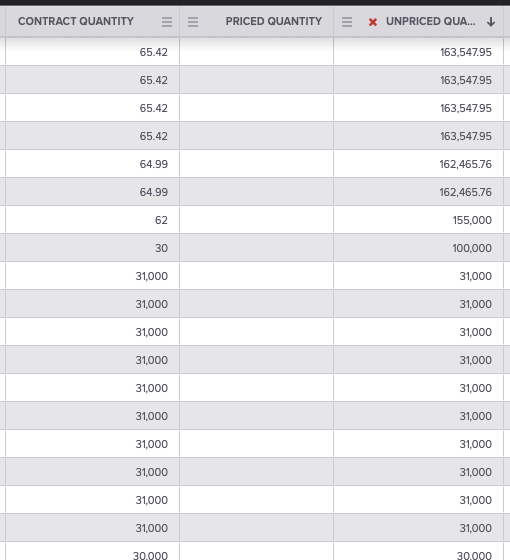
On screen, these appear in the Valuations grid as the Unit Quantity, Priced Quantity, and Unpriced Quantity columns (alongside Contract Quantity, Mark, MTM Change, and Unrealized).
Unit vs priced quantity on a valuation row. Capture: the Valuations grid showing the Unit Quantity, Priced Quantity, and Unpriced Quantity columns side by side for partially-priced positions. Caption: The same row carries unit quantity (the whole position), priced quantity (fixed so far), and unpriced quantity (still to fix) — three different numbers answering three different questions. Alt text: A Molecule Valuations grid showing Unit Quantity, Priced Quantity, and Unpriced Quantity columns.
How inventory MTM is calculated
One row per netted position, not per ticket. An inventory entry aggregates across the inventory tickets that share a common attribute combination — account, asset, commodity, product, vintage, unit of measure, and currency, and (depending on your settings) book or origin. The result is a single inventory entry per as-of date representing the combined position for that combination. So one row is the netted position for that asset / commodity / vintage on that date — don't expect one row per ticket.
Valued at the mark. The position is valued at the current market price — the Mark — for that commodity/asset combination on the as-of date (the as-of is the valuation date).
No mark, no MTM. An inventory valuation will not have an MTM value if no price has been loaded for the matching product and as-of date. This is the single most common self-diagnosable cause of "my inventory shows no MTM."
How the inventory mark is found. Inventory marking runs through an inventory valuation configuration: each configuration covers an inventory segment (commodity, asset, currency, unit of measure, and optionally book and origin) and specifies a marking formula that resolves to the set of products used to value that bucket. When an inventory valuation updates, Molecule looks up the product(s) that the bucket is linked to and takes the nearest node on the curve for that product on the matching as-of date. If the bucket isn't linked to a product that has a loaded mark for that as-of date, the entry has no MTM. (Note: the exact-product-key match on commodity/ticker/vintage applies to financial-trade valuation against relevant products — it is not how inventory buckets are marked.)
WACOG
WACOG (Weighted Average Cost of Goods Sold) appears on the inventory valuation screen only when WACOG is enabled for your account — so if you expect WACOG figures and don't see them, the feature may simply be off for your account.
WACOG needs non-zero ticket volumes to calculate.
WAC vs WACOGS. WAC (weighted average cost) determines the positive inventory balance and is calculated from buy tickets only; WACOGS applies that average cost to sell tickets. Molecule recommends WACOGS, as it gives a more thorough view of inventory pricing.
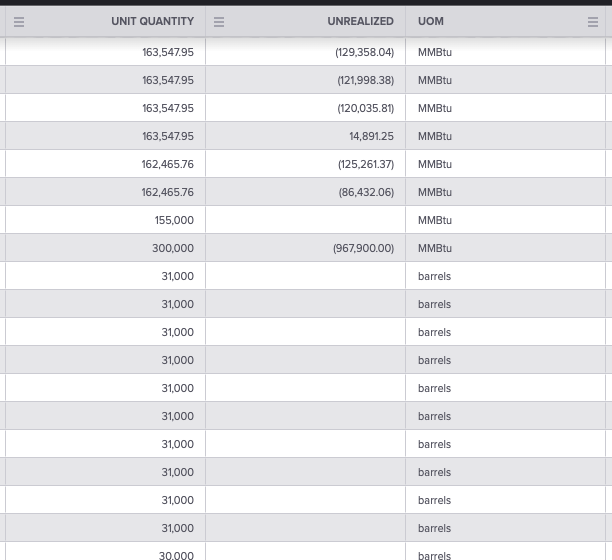
The inventory valuation shows a WACOG Value (the cost basis of the whole position under weighted-average cost of goods sold) and an Unrealized P&L (market value from the mark minus the cost basis from the price).
Mark, MTM Change, and Unrealized P&L on a valuation row. Capture: the Valuations grid showing the Mark, Prior Mark, MTM Change, and Unrealized columns for a netted position. Caption: With a mark loaded, the valuation shows the market price (Mark) and the resulting Unrealized P&L; with WACOG enabled, an inventory entry additionally shows the WACOG Value cost basis. Alt text: A Molecule Valuations grid showing Mark, MTM Change, and Unrealized columns.
Asset MTM and Changed P&L
For physical assets, Changed P&L (changed_pnl) is the change in valuation from the prior as-of date: current valuation minus the prior entry's valuation.
The "prior as-of date" is the last CME-calendar weekday before the current as-of — not the previous calendar day. That's why P&L change after a weekend or holiday is measured against the prior business day, and why a Monday change can look larger than a single calendar day's move.
When there is no prior entry , the prior valuation defaults to 0 , so Changed P&L equals the full current valuation. This is why an asset's P&L can show the entire position value the first day it appears — expected, not a bug.
What moves asset P&L between as-of dates:
new market data / marks for the product on the new date;
updated custom valuation models;
recalculation when asset valuation formulas are evaluated (triggered by an upload, a market-data change, or a manual trigger);
changes in the asset's recorded quantity or volume — which matter especially when an asset feeds a PPA (power purchase agreement) or as-generated trade quantity.
See "Metrics Molecule Calculates" for the business-day rule and "Valuation Outputs" for the field catalog.
Why can't I see asset or inventory MTM at all?
Sometimes the issue is access, not data — you may not see asset or inventory MTM because of permissions or feature gating:
Asset-based permissions. If your organization has asset-based permissions enabled, you only see trades (and their legs and sublegs) for the assets you're authorized for. No authorization for an asset means its positions are invisible to you, everywhere — the valuation results are silently filtered down to your authorized assets, so the data can simply appear absent.
Inventory feature / access. Inventory valuation data is served by the V2 inventory API. If your account is not provisioned for inventory , that endpoint returns a 403 error ("Your account is not provisioned to use inventory.") — not an empty result. An empty extract, by contrast, generally points to asset-permission filtering or genuinely no positions, rather than a missing feature.
Relevant roles include the ability to create assets and to maintain inventory tickets and records; these depend on the assets and inventory features being enabled for your account.
If you see nothing where you expect inventory or asset MTM, check with your Molecule admin whether the feature is enabled and whether you're authorized for that asset before assuming the data is missing. See "Permissions" and "Access Control - Users and Groups."
Quick self-diagnosis
Inventory shows no MTM → Is there a mark for the matching product and as-of date? Is the inventory bucket linked (via its valuation configuration / marking formula) to a product that has a loaded mark on that as-of date?
Inventory MTM looks off → Are you reading the netted attribute-combination entry (one row per combination per date), rather than expecting one row per ticket? Is WACOG enabled / expected?
Asset P&L "jumped" → Are you comparing against the prior CME weekday (not the calendar day)? Is this the first entry, where the prior valuation defaults to 0?
No asset or inventory data at all → Access / feature gating (see above).
Quantity looks wrong → Are you looking at unit quantity vs priced quantity? They're different things — see the vocabulary section.
FAQ
What's the difference between unit quantity and priced quantity?
Unit quantity is the whole position in physical units (MWh, MMBtu, barrels). Priced quantity is the portion of that quantity whose price has already fixed as you move through the quotational (averaging) period; the remainder is unpriced. One is how much; the other is how much has priced so far.
My inventory shows no MTM — why?
Almost always there's no mark for the matching product and as-of date. Confirm the inventory bucket's valuation configuration points to a product that has a mark loaded for that exact as-of date — if the linked product has no curve node for that date, the entry has no MTM.
Why did my asset P&L jump on Monday?
Changed P&L is measured against the prior CME weekday, so Monday's change spans the move since Friday's settle — not a single calendar day. And if it's the first entry for that asset, the prior valuation is 0, so the change equals the full position value.
Why don't I see any inventory positions?
Often it's access, not data: asset-based permissions silently filter valuations down to the assets you're authorized for, and an account that isn't provisioned for inventory gets a 403 from the inventory API rather than empty data. Check with your admin before assuming the positions are missing.
Is priced quantity the same as decayed quantity?
No. Priced/unpriced quantity tracks progress through the quotational (pricing) period; decay tracks fixing across the delivery period. Different mechanics answering different questions — priced quantity is not "unit quantity minus decayed quantity."
Related articles
Editor: hyperlink each of these to its help.molecule.io article before publishing.
If you're still stuck after the checklist above, contact support@molecule.io with the details listed in "If none of these explain it."