My P&L or Valuation Looks Wrong: A Diagnosis Guide
Last updated: October 7, 2026
When a valuation or P&L figure looks off — stale, not updated after a change, different between the screen and an extract, an unexpected size, or simply no value — there's usually a short list of explanations, and several you can resolve yourself in minutes. This guide walks them in order, starting with the single most useful fix: resaving the trade. It's the number-level companion to "Why Does My Report Look Wrong?" — that article is about which rows appear in a report; this one is about why a number looks off. (MTM — mark-to-market — is the current market value of a position; as-of is the date a valuation represents.)
Not covered here (see the companion articles):
Which trades or rows appear, or go missing, in a report → "Why Does My Report Look Wrong?"
Inventory/asset MTM and the priced-vs-unit-quantity question → the inventory and asset MTM article.
A missing or stale exchange settlement price specifically → the exchange settle-price article; general vendor-curve staleness → the stale-prices article.
Start here: resave the trade
If a value looks stale or didn't update after a change, the fastest fix is almost always to resave the trade. This re-runs the valuation engine for that trade, and values typically refresh within 2–5 minutes.
Open the trade in edit mode.
Change nothing.
Click Save .
Most of the time you don't need to do this. Molecule recomputes affected valuations automatically when any of these happens:
a mark is saved or updated for a product;
a trade is amended, cloned, or split;
an actualization is saved; or
a fee is added or changed on a trade.
These run in the background and can take a few minutes — so if a number looks stale right after one of them, give it about 5–10 minutes before assuming anything's wrong.
When a resave actually helps: a valuation still looks stale several minutes after one of the changes above, or a trade was updated through the API rather than a UI save (an API update may not always trigger the same recompute path). When in doubt, resaving is safe and fast.
For a large number of trades at once, resaving each one isn't practical — that's a bulk reprocess, which support can run for you. Send them the affected products or trades.
Resaving a trade to force a refresh
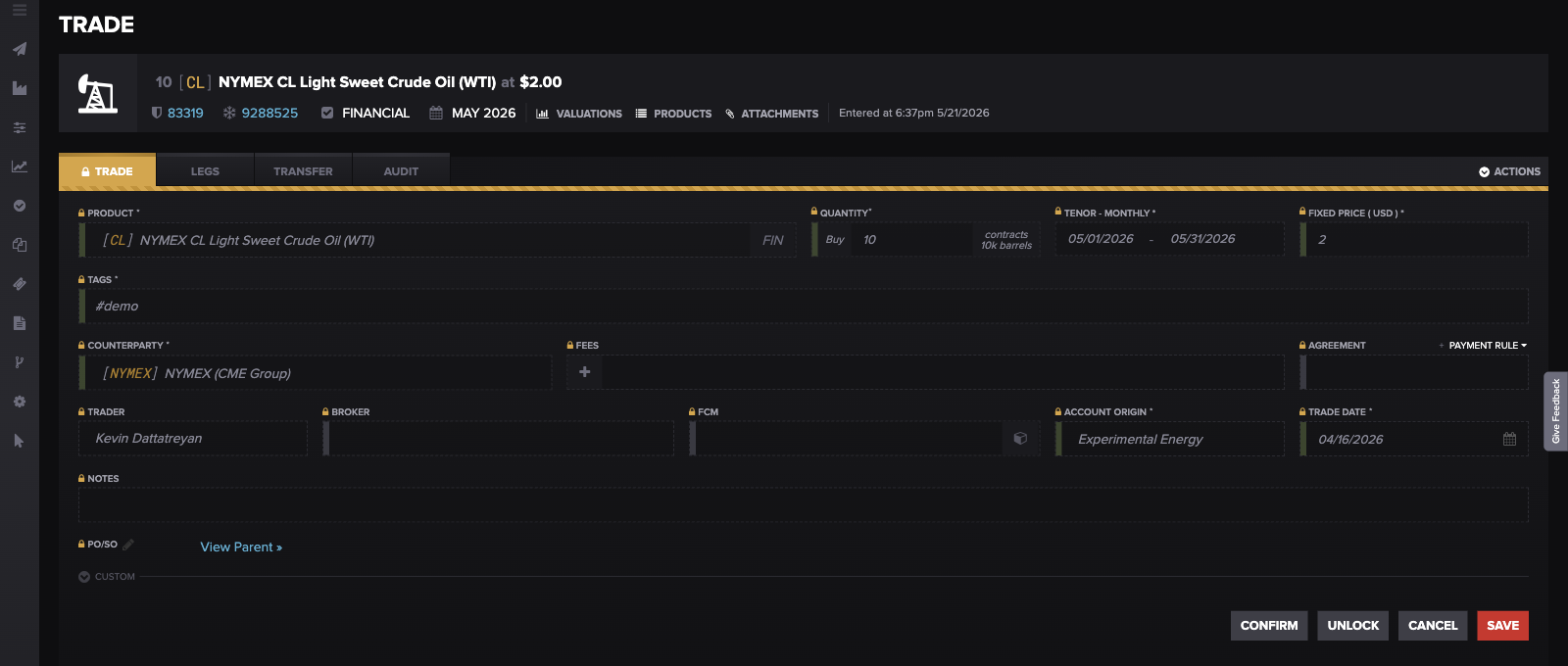
To force a single trade to recompute, open it in edit mode, change nothing, and Save — values refresh in about 2–5 minutes.
The UI and an extract don't match
Same as-of date, different numbers between the Valuations screen and an extract or API pull? This is one of the most common things we're asked about, and it's almost always one of these — not a calculation error.
Open vs. realized. The valuations API's status parameter has no default — omit it to return every status (open and realized). There is no status=all: all is not a valid value and passing it returns zero rows. To pull realized P&L specifically, request status=realized ( realized P&L is locked in once a position settles; unrealized is the mark-to-market on a still-open position). The valid status values are unrealized, realized, inventoried, rolled_forward, and shadow. An extract that looks "short" against the screen is often just this.
Expired trades and YTD. The standard Valuations screen shows a trade only while it's active — once it expires, it stops appearing there. But a year-to-date (YTD) valuations report keeps generating a row for every day of the year, even after the trade expires. So a YTD extract legitimately contains rows — and P&L — that the live screen doesn't. This is the most common YTD discrepancy.
YTD has to be enabled. If YTD reporting isn't turned on for your account, the YTD extract comes back empty. That's an account-level setting.
Export filters and columns. The Valuations screen's export reflects the columns currently visible and the filters currently active — hidden columns and active filters are left out of the export. If an export looks incomplete, reset the filters and restore the columns before exporting.
Grouped vs. leg-level. The screen may show trades grouped , while an extract returns leg- or subleg-level rows (a leg is one settlement period within a trade's tenor; a subleg is a subdivision of it). Row counts and subtotals won't line up one-to-one as a result.
The P&L "change" baseline. A day-over-day P&L change is measured against the prior CME-calendar business day , not the previous calendar day. So a Monday change spans the weekend and can look larger than a single day's move. The inventory and asset MTM article covers this prior-business-day rule in more detail.
Pulling open and realized valuations correctly
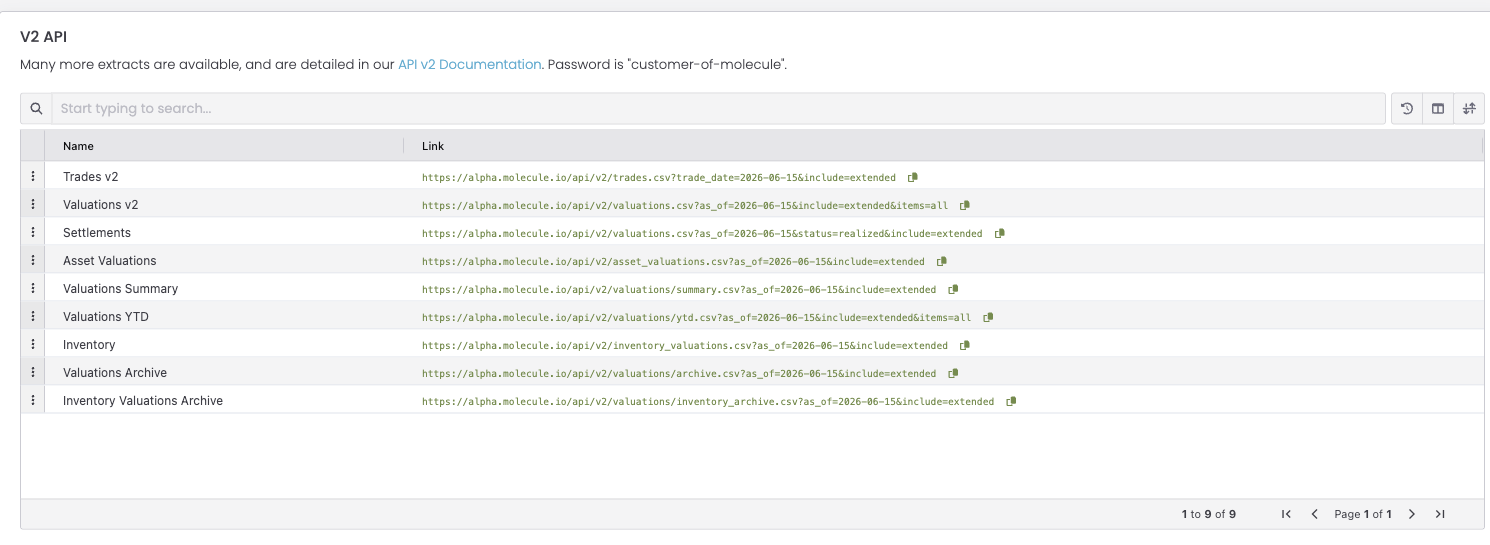
Molecule's prebuilt extracts show the correct pattern: the full Valuations v2 pull omits status (returning every status), while the Settlements extract uses status=realized for realized P&L. There is no status=all — passing it returns zero rows.
Is the mark stale?
A very common "wrong P&L" cause is the position valuing against a stale or copied mark instead of a fresh one. Quick self-check: look at the mark source on the valuation.
"Settles (Automatic)" — a fresh vendor/exchange settle. This is usually what you want.
"Copied from Prior Day" — a mark carried forward because no new price arrived. Stale.
"Substituted Prelims (Automatic)" — a preliminary mark standing in, not the final settle yet.
These friendly labels are the values of the mark-source filter on the Curves (Market Data) screen. On a trade's Valuations screen, the equivalent column is Mark Level (and Prior Mark Level), which shows the raw curve-source code — for example "copy" for a mark copied from the prior day, or "none" when no mark is present.
If you see "Copied from Prior Day" on a day you expected a fresh price, the P&L is marking to stale data. For the full treatment — including the temporary-mark workaround — see the exchange settle-price article (for exchange settles) and the stale-prices article (for vendor curves).
The mark on a valuation (Mark Level)
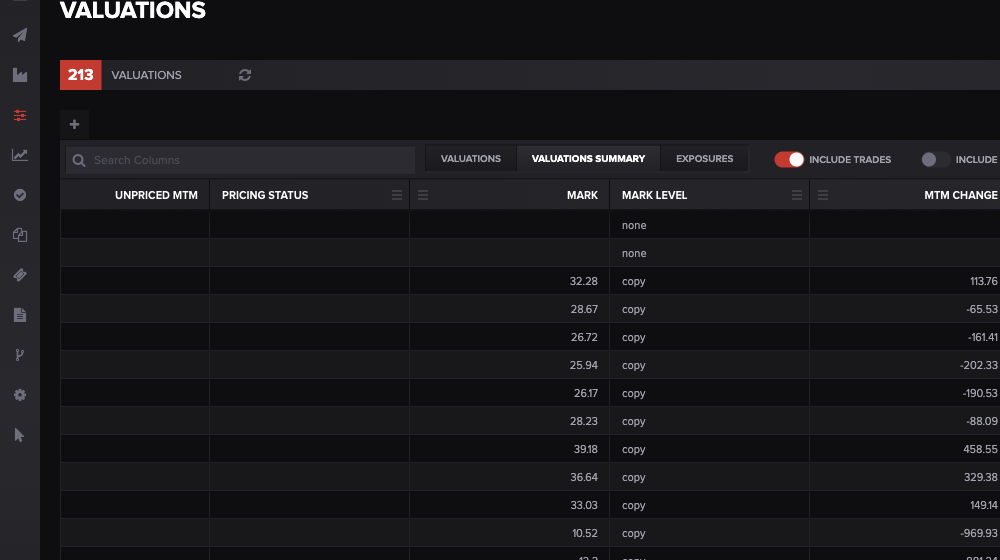
On the Valuations screen, the Mark Level column shows the raw curve-source: "copy" means the position is marking to a carried-forward (stale) price. The Curves mark-source filter labels this same source "Copied from Prior Day."
Marks are per-product, not per-counterparty
Customers sometimes expect two counterparties — or two books — on the same product to show different marks. They won't, and that's correct: a mark belongs to a product, and it applies to every trade referencing that product and contract period, regardless of book, counterparty, or asset. Market prices are properties of products, not of individual trades. So "these two trades on the same product have the same mark" is expected behavior, not a bug.
Where a book-level discrepancy does legitimately arise: right after a trade is moved between books.
A YTD figure can keep showing P&L under the original book if the re-index ( re-index = the report index catching up to the change) hasn't fully propagated. Re-saving the moved trade often triggers that re-index itself; for many trades at once, support can run a batch re-index.
A transfer done without an offsetting entry leaves a position difference between the old and new book. The clean fix is to book the offsetting entry in the original book.
So if P&L looks wrong immediately after a book move or transfer, that's the place to look.
The valuation didn't complete
If a valuation shows no value or looks incomplete, the engine may not have finished — most often because required market data is missing for that product and as-of date. There's a valuation-completed indicator that reads false (incomplete) when the computation couldn't finish for lack of a mark.
The fix path is mark/curve troubleshooting: is there a mark for this product and as-of date? Start with the stale-prices article and "Valuation & Relevant Products" (which products a valuation depends on). Once a valid mark is in place, the valuation re-runs and the value populates.
A quick self-check
Looks stale / didn't update → resave the trade (edit mode → Save), wait about 2–5 minutes.
UI ≠ extract → omit status (or use status=realized) — there is no status=all , the expired-trade YTD behavior, your export filters and columns, and grouped-vs-leg rows.
Marking to the wrong price → check the mark source ("Copied from Prior Day" / "Substituted Prelims" means not fresh).
"A different counterparty should differ" → it shouldn't; marks are per-product.
Wrong right after a book move/transfer → re-index lag or a missing offsetting entry.
No value at all → the valuation didn't complete (missing market data).
What to send support
If the self-checks don't resolve it, include:
the as-of date and the specific value that looks wrong, versus what you expected;
one or two example Trade IDs ;
where you're seeing it (Valuations screen vs. which extract or endpoint), and whether the UI and extract disagree;
the mark source shown on the affected valuation;
whether you've already resaved the trade and waited a few minutes;
if relevant, whether the trade was recently moved between books or updated via API .
FAQ
My valuation didn't update after I changed something — what do I do?
Resave the trade: open it in edit mode, change nothing, and Save. Values usually refresh within 2–5 minutes. Most changes recompute automatically, so this is mainly needed if it still looks stale after a few minutes or the change came through the API.
The UI and my extract show different YTD P&L — why?
Usually one of three things: the API returns open and realized when you omit status (or pass status=realized) — status=all is not valid and returns zero rows; an expired trade still generates daily YTD rows even though it's dropped off the live screen; or your export is reflecting active filters and only the visible columns. Check those first.
Two trades on the same product show the same mark — is that wrong?
No — that's correct. A mark belongs to the product and applies to every trade on that product and contract period, regardless of counterparty or book. Marks aren't per-counterparty.
My P&L is wrong after moving a trade to another book — why?
Two common reasons: the re-index hasn't fully propagated, so the old book still shows the P&L (re-saving the moved trade often clears this), or the transfer was done without an offsetting entry, leaving a position difference (book the offset in the original book).
The valuation shows no value — why?
It likely didn't complete because a mark is missing for that product and as-of date. Once a valid mark is in place, the valuation re-runs and the value appears — start with the mark/curve troubleshooting articles.
Related articles
Editor: hyperlink each of these to its help.molecule.io article before publishing (URLs to be confirmed once web access is restored).
If you're still stuck after the checklist above, contact support@molecule.io with the details listed in "If none of these explain it."